Video Captions automatically generates, styles, and burns subtitles into your videos — right on your device or with cloud models.
WHETHER YOU'RE A CREATOR, EDUCATOR, OR ACCESSIBILITY ADVOCATE
– Reach wider audiences with accurate captions in their language
– Make your Reels, Shorts, and TikToks more engaging and inclusive
– Create accessible content without breaking the bank
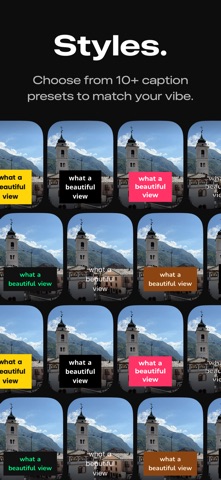
80+ CAPTION STYLE PRESETS
– Choose from carefully designed presets across 8 curated collections — Bold, Soft & Wellness, Handwritten, Lifestyle, Editorial, Retro, and more
– Highlight the active spoken word with karaoke effects, keyword boxes, color swaps, or underlines
– Smooth entry animations: fade, slide, scale-bounce, blur in, and overshoot
– Full control over font, size, text color, background, and position — with transparency support on every color
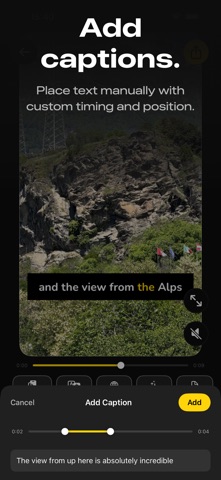
– Place captions anywhere on the frame — top, center, or bottom
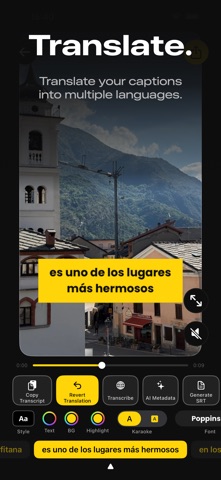
TRANSLATE INTO MULTIPLE LANGUAGES
– Translate your captions into multiple languages with a single tap
– Easily revert back to the original captions at any time
AI-POWERED METADATA
– Generate video titles, descriptions, and hashtags with on-device AI
– Choose a tone — Professional, Casual, or Fun — to match your style
– Copy and share instantly to any platform
PROJECTS & AUTO-SAVE
– Your work is automatically saved as a project so you can pick up where you left off
– Browse your projects in a visual grid with video thumbnails
– Filter projects by transcription language to quickly find what you need
HOME FEED
– Discover caption styles through curated collections on your home feed
– Preview how each style looks before you start editing
– Jump straight into transcription with a single tap
SRT EXPORT
– Export captions as standard SRT files for use in any video editor or platform
– Smart sentence detection for clean, readable subtitle formatting
PROFESSIONAL EXPORT
– Captions rendered permanently into the video file
– HDR support preserves the full dynamic range of your footage
– Background export lets you keep using your phone while your video renders
– Original audio preserved with no quality loss
– Ready to share on any platform or social media
MULTILINGUAL TRANSCRIPTION
– Supports 30+ languages with accurate speech recognition
– Choose on-device transcription, or optional cloud models for even more accurate results on fast speech, accents, and noisy audio
– Switch languages and re-transcribe without losing your edits
Terms of Use (EULA): https://www.apple.com/legal/internet-services/itunes/dev/stdeula/