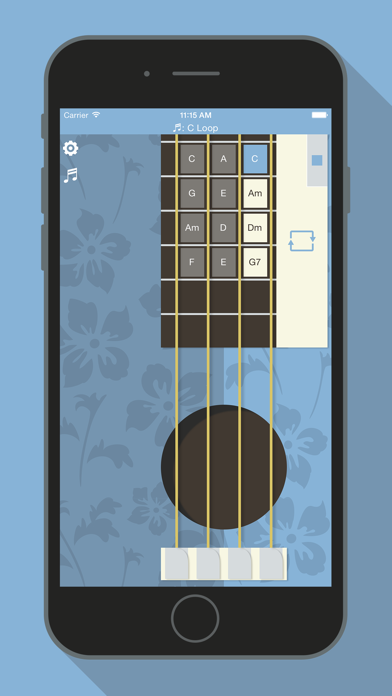
It's an electronic programmable Ukulele, the typical Hawaiian music instrument. Lot of songs are yet ready to be played! Enjoy playing this exotic instrument!
• Flat Design Graphic & Realistic Ukulele Graphic!
• Shake...
… to play the chords!
• More than 100 available chords
Combine them to create new songs. All the chords that you need are in your hand!
• Play, create, share with the community
Download the chords to play lot of songs. Create new songs, save them on your device and share them with all the world! It's easy, free and it doesn't require any registration.
• Simple, portable, complete
Everybody can play. The expert guitarists can always show their abilities improvising arpeggios, thanks to the multitouch!
• For right and left handed people
Touching the Lefty or Righty button on the application back view, the whole Ukulele will reconfigure itself on your style!
• Jam Session
Join guitars, pianos and other classic musical instruments to create definitely new music tracks!
• High Res Graphic, HD Sounds, hyper-realistic
The sounds are uncompressed. The chords truly vibrate!
• Free!
You don't pay a cent thank's to the Adv support!
• Tips!
For more informations and "how to" read the integrated help section.
Connect your device to an external speaker for a louder sound.
QUICK HELP
**************
• Follow this steps to play:
1. Choose a chord touching it on the Ukulele neck;
2. Play it as you would do on a real Ukulele;
3. Shake the iPhone to strum!
Start play immediately, choose among the songs already available tapping the song (note) icon.
• Follow this steps to program the chords on the Ukulele neck:
1. Tap the settings icon;
2. Tap the chord you want to replace and pick the new in the picker list;
3. Repeat the steps for all the chords you want to change.
• Follow this steps to program a chords sequence to loop in:
This function is useful to play your favorite song. You just need to program the chords, shake your iPhone and loop at time through them, tapping just a button.
1. Program the chords as written before, starting from the top-right of the grid, down for the column, then up again and so on;
2. Move the slider to fit the number of chords you want to loop through;
3. Finally, on the Ukulele view, touch the big metal chords-holder to loop through the programmed chords (showed in light brown color).