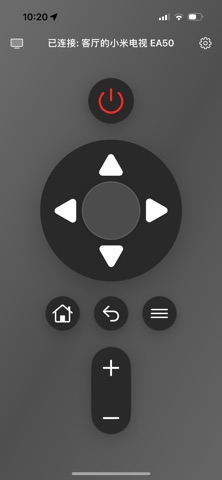
TV Remote is a WiFi remote control app designed for smart TVs.
When your phone and TV are connected to the same WiFi network, the app can automatically discover nearby available TVs and provide a simple, intuitive remote control experience. It supports essential actions such as directional navigation, OK, Back, Home, Menu, and Volume control, turning your phone into a practical TV remote.
Key Features:
1. Automatically discover smart TVs on the same local network
2. Manually connect by entering the TV's IP address
3. Control navigation, OK, Back, Home, Menu, and Volume
4. Save recent devices for quick reconnection
5. Best-effort compatibility across different TV brands and models
6. Minimal and easy-to-use interface for everyday home use
Notes:
1. Make sure your phone and TV are connected to the same WiFi network
2. Available features may vary by TV brand, model, and system version
3. Some advanced buttons may require protocol support from the TV itself
Whether you cannot find the physical remote or simply want a more convenient way to control your TV, TV Remote offers a lightweight and efficient experience right from your phone.
This service is a subscription-based paid service, which means you will prepay for future subscriptions. Currently, you can choose to use the service on a quarterly basis. At the end of each subscription period, your subscription will automatically renew by default unless you cancel the auto-renewal yourself or we terminate the service.
2. Cancel Subscription: To cancel renewal, please operate the cancellation at least 24 hours in advance. You can cancel via the following method: Open System Settings - Click Apple ID - Click Subscriptions - Select iCost Pro, and cancel the subscription.
3. Restore Purchase: If you receive a notification stating "You are currently subscribed to this item" during the payment process and confirm that you have previously completed the purchase, you can click "Restore Purchase" in the upper right corner to resume the purchase.
Membership Service Agreement and Auto-Renewal Agreement:
https://gcn1s2rmayw3.feishu.cn/wiki/Y0VwwHvHBiSIzuknedjcWwaPnRh?from=from_copylink
Privacy Policy:
https://gcn1s2rmayw3.feishu.cn/wiki/TDWAwrjLhiXArGkFcxkc1SAqnCf?from=from_copylink