See what's due at a glance.
Timetodo is a color-coded task manager that helps you see what needs attention today and what can wait.
Use colors and alerts to stay on top of tasks without keeping everything in your head.
◆ See due dates clearly
・Tasks with closer due dates appear higher in the list, making it easy to find what to do next.
・Colors change as due dates approach, helping urgent tasks stand out.
◆ Stay on track with alerts
・Choose exactly when you want to be notified.
・Tasks with active alerts use a lighter background, keeping your focus on what matters now.
・Hide tasks with alerts temporarily to keep your list focused.
◆ Flexible tools for your workflow
・Flexible repeat schedules for routines and recurring tasks.
・Groups for organizing work, personal tasks, shopping, and more.
・Pull down to quickly add today's tasks.
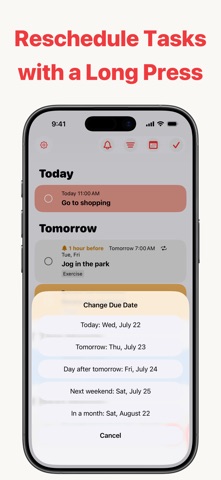
・Long-press a task to quickly reschedule it.
・Subtasks for breaking larger tasks into manageable steps.
・Widgets for checking tasks from the Home Screen.
・Dark Mode for comfortable viewing.
◆ Timetodo Membership
Unlock additional features for larger and more detailed task lists.
・Unlimited subtasks.
・Unlimited snooze settings for repeating alerts.
・Unlimited calendar browsing beyond the current month.
・Unlimited search length for finding tasks quickly.
● Price
"Monthly Membership" $2.99/month (auto-renewing subscription)
● Restore on a new iPhone
Sign in with the Apple Account used for the original purchase, then tap "Restore Purchases" on the Membership screen. You can restore your membership at no additional charge.
● Manage or cancel your subscription
On your iPhone, open Settings, tap your name, tap "Subscriptions," then select Timetodo. You can view or cancel your subscription there.
● Auto-renewal
Your subscription renews automatically unless canceled at least 24 hours before the end of the current billing period.
Your Apple Account will be charged within 24 hours before the end of the current billing period.
● Important
・Subscriptions must be canceled through your Apple Account settings.
・Cancellation takes effect at the end of the current billing period.
・Payment will be charged to your Apple Account.
■ Terms of Use & Privacy Policy
https://apps.mishimadesign.com/timetodo/legal.html#terms-en