A tab browser built for one hand: swipe anywhere on the screen for the next tab. Ad and popup blocking is on by default.
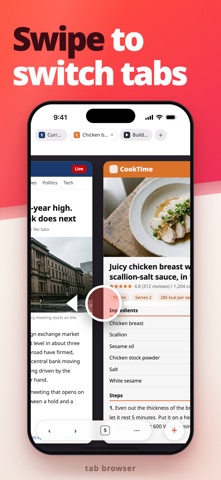
■ Swipe to switch tabs
No need to open the tab list: swipe sideways on the page for the next tab, or from the screen edge to go back or forward.
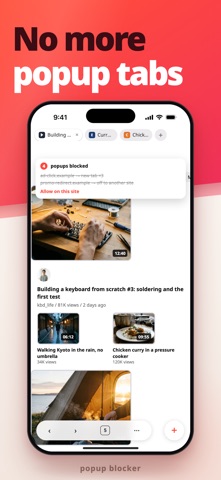
■ Block ads and popups
Banner ads and tracking scripts never load. Basic filters are free and update daily.
・Stops self-opening tabs, full-screen ads, and redirect ads; review what's blocked, or allow a site
・Hides cookie banners and social share buttons, and skips images to save on data
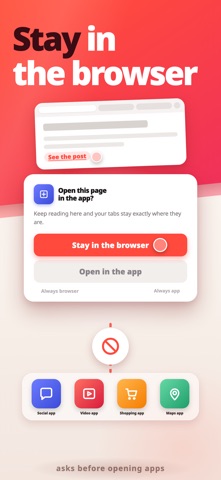
■ Stay in the browser
Links to X, YouTube, Instagram, or LINE keep you in the browser; choose to stay or open the app, remembered per site.
■ Gestures
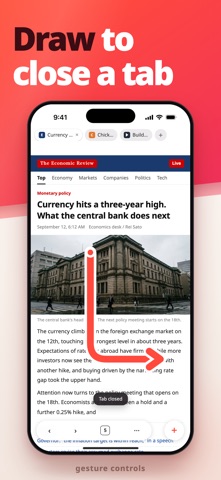
・L shape: close the tab. Reverse L: reopen it. Upward L: new tab or tab list. V shape: jump to the top or bottom
・U and sideways L shapes can be assigned too, to ten more actions such as reload, back, forward, or add bookmark
・Hold a link to open it in a background tab. Swipe the new tab button up to close the current tab
■ Tabs
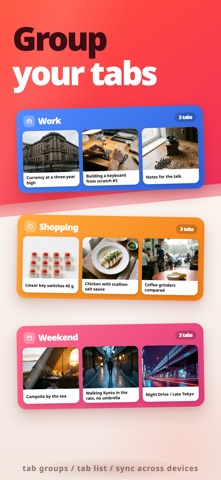
・Group tabs by color, fold and expand them, and keep pinned tabs first even through "close all"
・Closed tabs are listed under Today, Yesterday, and Last Week, ready to restore, and a tab playing music keeps playing even when you switch away
・No limit on tabs. Relaunch, and every tab and its history comes right back, with thumbnails and reordering in the list
■ Bars and menu
・Toolbar top or bottom, hiding as you scroll; gaming mode leaves just the URL and tab bars, which can match the site's color
・Reorder menu items, pin favorites to the toolbar, or save sites as quick access buttons
・Open a page in a floating window you can move and resize while reading
■ Search and new tab
・Google, Bing, Yahoo!, DuckDuckGo, or Baidu, with suggestions, history, and bookmarks as you type
・A new tab page of tiles for favorite sites, echoed in a widget
・Open a copied URL on return to the app, or send a page here from any share sheet
■ Bookmarks and history
・Nest folders your way; reorder, edit, or swipe to delete
・History by day: clear the last hour, today, today and yesterday, or everything; cache and cookies clear separately
■ Video and music
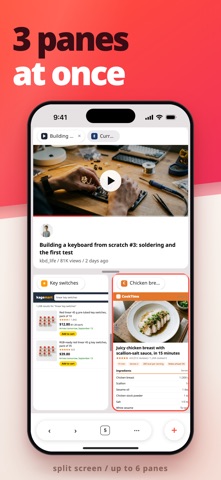
・Keep playing when you switch apps or lock the screen, watch in Picture in Picture, and split the screen into up to six pages, stacked or side by side, even on iPhone (Premium)
■ Read and research
・Translate a page as is, or switch to a reader view for just the article
・Read aloud in a natural voice, highlighting each paragraph, with adjustable speed and a sleep timer, across tabs or with the screen off
・Night mode, text size, desktop view, full screen, find on page, sharing, AirPrint, save as PDF
・Capture an entire page as one screenshot (Premium)
・Download and manage files
■ Privacy
No personal data is collected; your browsing and searches never reach the developer. Private tabs leave no history or cookies and stay hidden in the app switcher. Lock the app, or just private tabs, with Face ID or Touch ID and a delay you set; trackers are blocked with the ads.
■ iPad and external keyboards
Three layouts for the bigger screen: popover menus, a side-panel tab list, and two-pane settings, plus shortcuts like ⌘T for a new tab.
■ tabbrowser Premium (monthly or yearly subscription)
Basic ad blocking stays free. Premium unlocks:
・Advanced ad blocking: ads on video sites, clutter, "disable your ad blocker" walls, and tap-to-remove ads that slipped through
・Background playback, Picture in Picture, and split screen
・iCloud sync for bookmarks, history, and tabs
・Full page screenshots and 40 alternative app icons
Your subscription is charged to your Apple ID at purchase and renews unless canceled at least 24 hours before the period ends. Manage it in your App Store account settings.
Terms of use: https://dkit.jp/en/terms/
Privacy policy: https://dkit.jp/en/privacy-policy/