Plan wall framing in seconds — wood or steel, straight or rake/gable — with full material takeoffs, client quotes, and cut lists ready for the job site.
Built for iOS 17. No accounts. No analytics. No advertising. No tracking SDKs. 100% offline — every calculation runs on your phone, so it works in a basement or anywhere else with no signal.
WHAT YOU CAN DO
• FRAME A SINGLE WALL
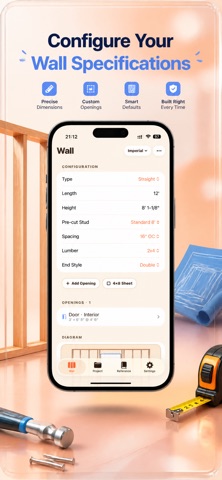
Enter length, height, and on-center spacing (12", 16", 19.2", or 24"). Choose 2x4 or 2x6 lumber. Get instant stud counts, plate lengths, board feet, wood volume, and wall area, with a live layout and your choice of end-stud configuration. Tap any field to type over it instantly.
• STEEL FRAMING
Cold-formed steel studs for non-load-bearing partitions — track and stud linear-foot takeoffs, gauge selection, and self-drilling screw counts.
• RAKE, GABLE & ASYMMETRIC GABLE WALLS
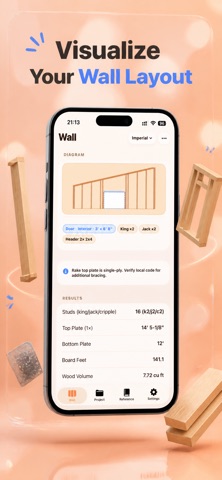
Enter a pitch (3:12 to 12:12, or custom) or low/high heights. Gable walls support a center or off-centre ridge with independent left/right slopes. Every stud comes out with its exact length and bevel angle, ready to cut.
• DOORS, WINDOWS & CORNERS
Drop in any opening with its rough opening size, and position it from the left edge, right edge, or center — one tap. King studs, jack studs, cripples, sills, and headers are calculated for you, including built-up trimmer posts for wide openings per IRC R602.7.5.
• CUT LIST & MATERIAL TAKEOFF
A full board-by-board takeoff — studs, plates, headers, blocking — per wall and across the project. Sheathing and drywall sheet counts, insulation coverage, and fastener estimates included. A buy list shows how many sticks of each market length to order, exportable as CSV.
• 4×8 SHEET LAYOUT
See exactly where OSB or plywood panels land on your wall. Edges on a stud are green; unsupported joins are flagged red before you start nailing.
• FIXTURE BACKING
Point-placed blocking for grab bars, TV mounts, and cabinets, each with its own board footage and diagram placement.
• PRESETS
One tap loads standard pre-cut heights (92-5/8", 104-5/8", 116-5/8"). Or save your own wall configuration once and reuse or update it on any wall.
• MARK-OUT GUIDE
A copy-ready list of measured positions along the plate — for marking studs on-site without re-counting.
• MULTI-WALL PROJECTS
Save framing jobs across multiple walls with intersection tracking (shared studs auto-deducted at T-junctions). Duplicate a wall or start the next one pre-filled with the last. Undo an accidental delete. Track totals: studs, plates, board feet, wood volume, wall area, and cost.
• CLIENT QUOTE PDF & EXPORT
A client-ready estimate with labor hours, material subtotal, markup, and tax — without exposing your cut list. Or export a full PDF with diagrams, cut lists, mark-out positions, and material summary.
• IMPERIAL AND METRIC
Feet-inches-fractions down to 1/8", or millimeters. Switch anytime without losing your project.
• YOUR OWN iCLOUD SYNC
Projects sync across your iPhone and iPad through your own iCloud account — optional, can be turned off in Settings. Never touches our servers; there are none.
• IRC REFERENCE BUILT IN
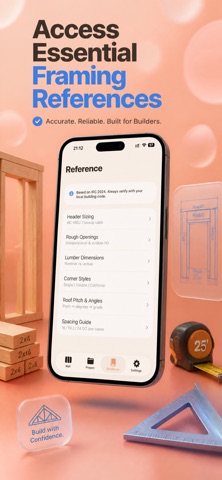
IRC R602.7 header sizing, bearing and point loads, nominal vs. actual lumber sizes, steel gauge-to-mil, common rough opening sizes, corner stud configurations, and roof pitch to angle conversions.
PRIVACY FIRST
StudPlan runs on-device. No login. No analytics. No advertising. No tracking SDKs. No camera, photo library, location, or microphone access requested. Turn on iCloud sync and your projects sync only through your own iCloud account — never through our servers, because we don't have any.
3-day free trial, then $1.99/week. Monthly, yearly, and lifetime options available. Cancel anytime.
Terms of Use: https://taxlite.net/stud_plan/terms.html
Privacy Policy: https://taxlite.net/stud_plan/privacy.html