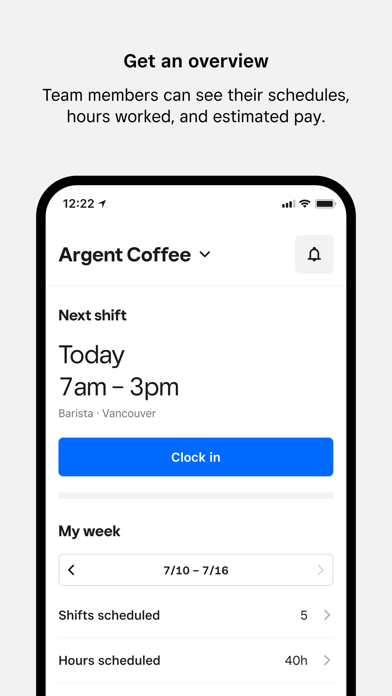
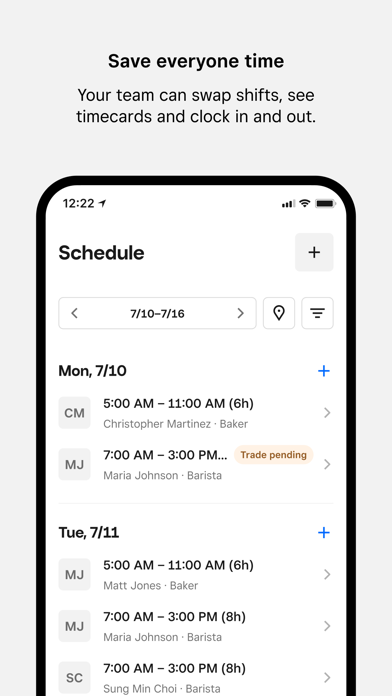
Square Team app is the one place for your team to communicate, manage schedules, access timecards, and stay in sync — all on the go. It also allows them to see their hours worked, breaks, overtime, and estimated pay.
Built for businesses using Square, the app enables employees to clock in and out on their phones instead of at the POS, which saves time and eliminates the need for team members to crowd around the POS to clock in. Employers can manage teams more easily, adjust schedules, and empower their employees by putting critical shift information at their fingertips. Employers using Square Payroll can easily pay their team, automatically importing timecards, tips, and commissions.
Your whole team can chat using real-time messaging and employers can send out important updates and announcements so the whole team stays in the know.
Team members can see when and where they’re scheduled to work, pick up open hours, and make sure their work schedule fits with their personal one. It also allows them to see their hours worked, breaks, overtime, and estimated pay. And if team members are paid through Square Payroll, they have access to their pay stubs and tax forms right on their mobile phones.
Home Screen
• Clock-in: Team members can clock in for an upcoming shift directly through Team app
• Weekly Snapshot: Team members can get a quick snapshot of when and where they’re scheduled to work
• Estimated pay: Team members can also see hours worked, breaks, overtime, tips and estimated pay
Messages and Announcements
• Messaging: Real-time messaging for the whole team, eliminating the need to share phone numbers.
• Announcements: Easily broadcast important announcements, news, and updates to everyone on the team.
Shifts
• Team-initiated scheduling: Empower your team to request time off, swap shifts, and claim open shifts directly from the Square Team app.
• Timecards, schedules and estimated pay: Team members can view timecards, scheduled hours, and view estimated pay.
• Clock in and out: Enable team members to clock in and out, take breaks, and get notifications.
Payroll
• Owners using Square Payroll can easily pay W2 employees and 1099 contractors, automatically importing timecards, tips, and commissions
• Our team of specialists will take care of the rest—we pay your team, file your payroll taxes, and send your tax payments to federal and state tax agencies.
My Pay
• If team members get paid through Square Payroll, they can:
• See estimated earnings, even before they get paid
• Get paid faster via Cash App
• Download tax forms
• Update their bank account or personal details
• And all staff information is stored securely
Team Management
• Quickly see all of the team members at your location, edit team member information directly in the app, or resend invites to the team.
More
• Team members can update personal and account settings on the go.
Download the Square Team app and invite your team members now.