StoreIntel
AppsTop ChartsTrendingKeywordsMy Apps
Not affiliated with Apple Inc. App Store is a trademark of Apple Inc.Top chartsSupportTermsPrivacy

Splitly - Group Expenses

Yichun Wang · Finance · 8mo old

Free
◆ ProTrack this app App Store

Performance · US

Est. downloads / month · US

<5K

Below chart threshold

Est. revenue / month · US

<$5K

Below chart threshold

Rating · US

—

no ratings yet

Chart position

Rank history — US · Top Grossing

Apple's Top Grossing chart — all apps ranked by revenue (purchases + subscriptions).

Top FreeTop Grossing

Ratings count — US

0
◆ Pro1 chart locked

See the numbers behind the rankings

  • Keyword RankingsWhich App Store searches it ranks for, and where
Unlock everything

Listing

About

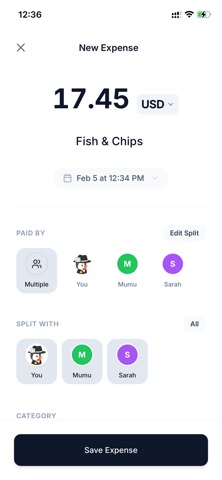
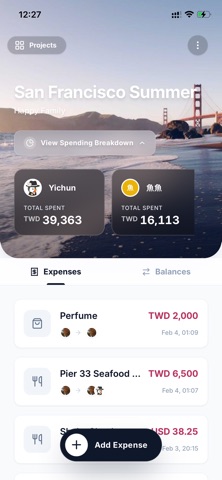
Traveling abroad, sharing rent, or splitting dinner—calculating "who owes what" is always a headache. Splitly is built for simplicity and efficiency, designed to save you from complex calculations. - Minimalist by Design: Splitly does one thing perfectly—splitting bills. No bloat, no clutter, just the essential tools you need for a seamless experience. - Multi-Project Management: Organize expenses by project. Keep "Japan Trip," "Date Night," or "Shared Rent" accounts separate and perfectly organized. - Global Currency Support: Support for currencies worldwide. Record expenses during international travel without getting confused by exchange rates. - Crystal Clear Settlements: See "who owes who" at a glance. Our smart engine calculates the most efficient repayment path to minimize the number of transfers. - Flexible Member Setup: Sync with friends or use "Virtual Members." Even if your friends don't have the app, you can still manage their shares effortlessly. Try Splitly today—because smarter splitting means a better life.

Released
Feb 11, 2026
Category
Finance
Content rating
4+
Price
Free
In-app purchases
No
WWUSGBDEJPINBR

No chart data

No rank history yet for this selection.

→

Screenshots

5
Splitly - Group Expenses screenshot 1Splitly - Group Expenses screenshot 2Splitly - Group Expenses screenshot 3Splitly - Group Expenses screenshot 4Splitly - Group Expenses screenshot 5