Core Features
AI Stem Separation
Separate any song into 6 individual tracks with one tap:
Drums
Bass
Piano
Guitar
Vocals
Other Instruments
Control each part independently for focused practice and listening.
Detailed Stems
The busiest tracks can be split one level deeper:
Lead Guitar
Acoustic Guitar
Strings
Synth
Brass
Saxophone
Back Vocal
Extracted parts become their own tracks, while the rest is grouped into "Remaining Other" and "Lead Vocal".
Toggle them any time, solo them, or export them alongside the base tracks.
Detail models download on demand and run entirely on your device, so your audio is never uploaded.
Import Audio or Video
Import audio and video files from local storage or your photo library.
You can also record audio or rehearsal videos for practice tracking and content collection.
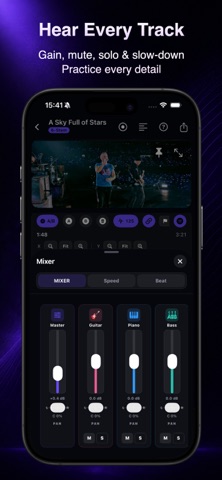
Mute, Solo, and Track Control
Mute instruments, solo individual parts, or adjust the volume balance of each track.
Focus on exactly what you want to hear and practice.
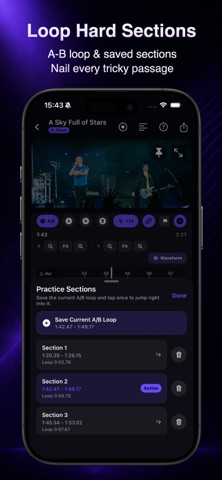
A/B Loop Practice
Create loop regions for difficult sections, save multiple practice segments, and quickly switch between them.
Improve repetition and training efficiency.
Speed Control
Adjust playback speed to slow down songs and hear rhythms, details, and performance nuances more clearly.
Ideal for transcription and slow practice.
Pitch Shift
Change the key of a song without affecting playback speed.
Perfect for singers finding a comfortable vocal range and musicians practicing in different keys.
Project Saving
Automatically save practice projects and history so you can continue where you left off.
No need to re-import files or recreate settings.
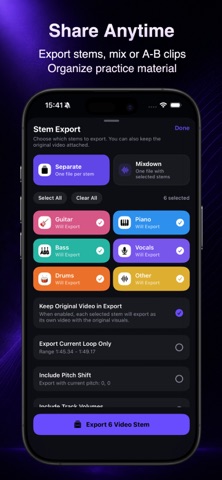
Track Export
Export separated tracks for sharing, rehearsal, backing track creation, or further practice.
Why Musicians Choose Jam
Turn full songs into practice tracks within seconds
Remove vocals for backing track practice
Practice individual instrument parts separately
Split guitars into lead and acoustic, or separate harmonies from the lead vocal
Loop difficult sections for focused repetition
Slow down songs to hear details more clearly
Change song keys to match different vocal ranges and practice needs
Support both audio and video practice workflows
Save long-term practice projects
Local processing for offline use and enhanced privacy
AI Chord Recognition Makes Learning and Playing Songs Easier
Chord Recognition by Beat
Chord Numbers Support
Flexible Key Switching
Who It’s For
Guitarists
Bassists
Drummers
Singers
Cover Musicians
Band Members
Music Students
Ear Training Learners
Transcription Practitioners
Rehearsal Preparation Users
EULA:
https://www.apple.com/legal/internet-services/itunes/dev/stdeula/