Enjoy Your Photos and Videos Like Never Before!
With SlideFlow, turn your favorite moments into beautiful, animated slideshows — on your iPhone, iPad, Mac, or TV. Create and play slideshows in seconds, customize them if you wish, and share them as videos with family and friends.
Instant Slideshow Playback
No rendering, no waiting: SlideFlow generates slideshows on the fly, so playback starts almost immediately.
A Different Slideshow Every Time
Turn on shuffle to vary the order, transitions, filters, and music every time you press play — and again with every loop. Leave a slideshow running on your TV at a family gathering, and it keeps changing. SlideFlow can apply a different filter on every playback, so you enjoy your photos and videos in a new way every time — without creating multiple versions in different styles.
Customize Your Slideshow
• Add music from a wide selection of built-in tracks across various genres, or add your own. Your tracks join your personal music library, synced via iCloud and ready for any slideshow. Music fades smoothly and steps aside while videos play their own sound.
• Choose from 33 transitions — dissolves, wipes, slides, whip pans, glitches, and more — plus an ending transition for a graceful finish.
• Bring photos to life with smart animations: zoom in on faces or subjects, or start close and zoom out to reveal the full scene.
• Apply stylish filters such as Monochrome, Sepia, Chrome, and Noir.
• Add text or image overlays for titles, captions, logos, and more.
• Mix photos and videos freely in the same slideshow.
• Shuffle, loop, and fine-tune settings for the whole slideshow or individual photos and videos. Set your favorite defaults once, and every new slideshow uses them.
Watch on Your TV
Cast slideshows or individual photos and videos to your TV. Connect your iPhone, iPad, or Mac to the same Wi-Fi or Ethernet network — nothing to install on the TV. Works with many DLNA-compatible TVs.
Export and Share as Video
Export your slideshows in horizontal, vertical, or square format for YouTube, Instagram, TikTok, and more. Choose 720p, 1080p, or 4K resolution, with H.264 or HEVC encoding to balance quality and file size.
Create Slideshows Automatically
Pick a date range, and SlideFlow groups your photos and videos into Moments — temporary slideshows named after their dates and places, made for exploring your memories. Save the ones worth keeping with a single tap.
You can also create saved slideshows directly from a date range, a Photos album, or a smart album, with filters such as favorites only, photos only, and skip screenshots.
Photos, Files, and Folders
Build slideshows from your Photos library, individual image and video files, or whole folders. Drop in a folder containing photos, videos, and music, and get a finished slideshow.
Choose whether files are copied into SlideFlow or referenced in place to save space — ideal for large collections stored on external drives.
Sync Across Devices
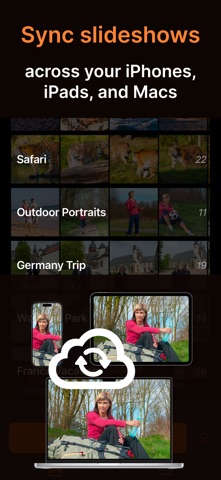
With iCloud sync enabled, your slideshows are synced across your iPhones, iPads, and Macs. Photos and videos from your Photos library must be synced with iCloud Photos.
Free to Download
Try SlideFlow for as long as you like. In unlimited free trial mode, generated slideshows include app promotions. Full access is available through subscriptions or a one-time lifetime purchase. Your purchase unlocks all features on iPhone, iPad, and Mac, and can be shared with your family through Apple Family Sharing.
Terms of Use: https://veprit.com/eula.html
Privacy Policy: https://veprit.com/VeprIT-PrivacyPolicy.pdf