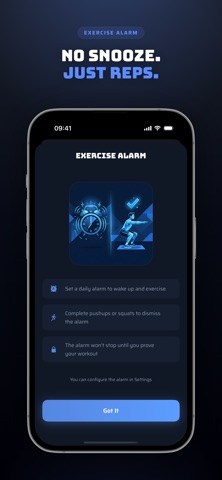
Block apps. Do pushups or squats. Take back control.
ScrollFit locks your distracting apps and only unlocks them when you move. Choose pushups or squats—your body, your choice. No cheating. No workarounds. Just results.
THE PROBLEM
You've tried app timers. You've tried willpower. You've tried deleting apps entirely. Nothing sticks. The apps always win.
THE SCROLLFIT DIFFERENCE
We don't just limit your screen time—we make you earn it. Want to open Instagram? Do 10 pushups first. Or 15 squats. You pick the exercise, you set the reps. Our AI-powered pose detection counts every rep, so there's no faking it.
HOW IT WORKS
1. Create Modes — Choose which apps to block (or which to allow—block everything else)
2. Set Schedules — Automatic locks that activate when you need them. Night mode from 11pm-7am. Focus mode on weekdays. You decide.
3. Start Instant Locks — Lock yourself out right now when you need immediate focus
4. Exercise to Unlock — Complete your mission to regain access. Pushups or squats—your choice at unlock time.
5. Need a Quick Break? — The "Take a Break" feature gives you temporary access (1-30 minutes) after a mini workout. Lock resumes automatically.
KEY FEATURES
Flexible Blocking Modes
Create reusable configurations. "Block social media." "Allow only work apps." Mix and match for different situations.
Smart Scheduling
Set it and forget it. Your phone locks automatically at the times you choose, on the days you choose. Supports overnight schedules that cross midnight.
Two Exercise Options
Pushups or squats—pick your poison at unlock time. Set different rep counts for each (maybe 10 pushups or 20 squats). Variety keeps it interesting.
AI Rep Counting
On-device pose detection ensures every rep counts. No internet required. No cheating possible.
Progress Stats
Track your daily locked time, exercise reps completed, and breaks taken. Watch your fitness add up over the week.
Take a Break
Life happens. Earn a temporary unlock (1-30 min) with a quick exercise set. Your scheduled lock resumes automatically.
PERFECT FOR
- Breaking the doomscroll habit
- Building daily exercise into your routine
- Staying focused during work or study
- Creating phone-free evenings
- Anyone who's tried other screen time apps and failed
NO ESCAPE ROUTES
Unlike other apps, ScrollFit has no "skip" button, no emergency unlock code, no way to cheat. You set the rules, and we enforce them. Plan accordingly—if you can't exercise, you can't scroll.
Terms of Use: https://www.apple.com/legal/internet-services/itunes/dev/stdeula/