A sheet music viewer app with easy page turning.
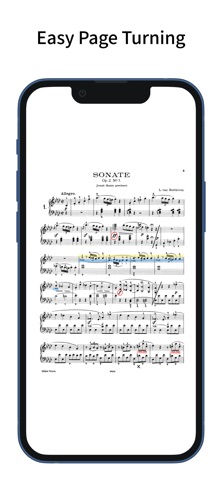
Turn pages with taps and swipes.
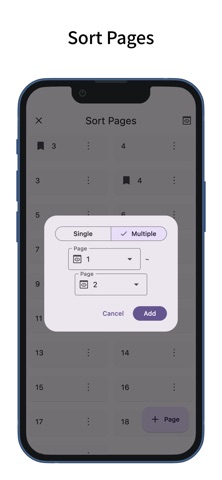
You can also reorder the pages of your sheet music.
Easy Page Turning
- You can turn pages with taps and swipes.
- Supports Bluetooth page-turning foot pedals.
- Tap assignments can be set to: previous page, left/right, top/bottom, next page, or disabled.
- Swipe gestures can be toggled on or off individually for up, down, left, and right.
- Actions other than page turning (such as displaying the menu or writing annotations) can be assigned to gestures that won’t interfere with page turning, such as long-pressing or tapping the top or bottom edges.
- Zoom operations on the sheet music (pinch or double-tap) can also be toggled on or off.
Page Reordering
- Reordering the pages makes page turning easier during repeats, dal segno, codas, and similar situations.
- When adding pages via reordering, you can add and drag multiple pages at once—not just one.
- You can also delete pages or add blank pages.
Annotations on Sheet Music
- You can write handwritten annotations on your sheet music.
- Two types of pens, markers, and an eraser are available, with undo and redo functions.
- Pens and markers allow you to choose line thickness and color, and you can draw straight lines.
- An eyedropper tool lets you pick up colors from the screen.
- You can output a PDF that includes your annotations.
Setlist
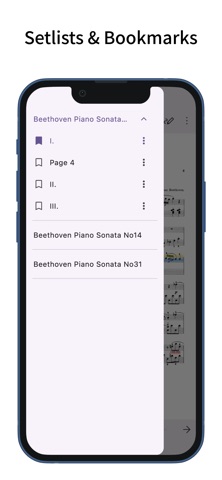
- You can group multiple pieces of sheet music into a setlist for continuous viewing without reopening files.
- Tapping the title in the menu bar displays the list of sheet music in the setlist; tapping one jumps to that piece.
Bookmark
- You can add bookmarks to specific pages of your sheet music.
- Bookmarks can have custom titles.
- Tapping the title in the menu bar displays a list of bookmarks; tapping one jumps to that page.
Page Layout
- You can choose from single-page, two-page (spread), fit width, fit height, half page (top/bottom), or half page (left/right) layouts for your sheet music.
- The layout can automatically change based on the screen orientation.
- When selecting fit width, the sheet music is displayed at full screen width, making it easier to view on small devices.
Color Filter
- You can apply a color filter to your sheet music, choosing from sepia, green, or inverted.
- If you find the white of the sheet music too bright, this setting may improve readability.
Adding Sheet Music
- You can add sheet music in PDF format.
- In the sheet music list screen, tapping the plus button at the bottom right lets you add PDF files from your device. (In the setlist screen, tapping the plus button opens the setlist addition screen.)
- You can also add sheet music by sharing PDF files from other apps.
- Multiple pieces of sheet music can be added at once.
Managing Sheet Music
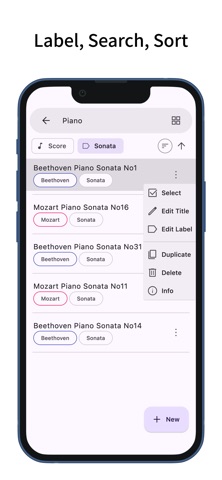
- The label feature lets you add labels to sheet music or setlists, allowing you to filter by multiple labels.
- Tapping the search bar lets you search for sheet music or setlists by title.
- Sheet music and setlists can be sorted by title, creation date, or last viewed.
Customization
- Supports dark mode.
- Allows you to change the theme color.
- Features a simple design adhering to Material Design principles.