• Manage your Passwords and Passkeys
• AutoFill Passwords in Safari and Apps
• Protect your Photos and Contacts
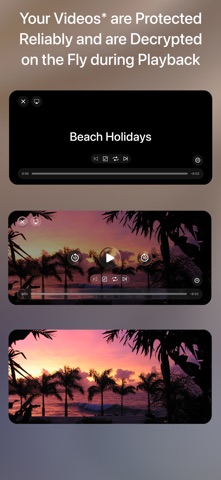
• Safeguard your Videos*
• Protect PDF, iWork and Office Documents*
• Securely Sync your Data via WiFi
• Login with Touch ID or Face ID
• Two-Factor Authentication (2FA / TOTP)
• Generate Strong Passwords
• Encrypt Stored Data with AES-256
• Add Geofences to Items
• Access Items Nearby from the Widget
• Import Data from other Apps and Password Managers in CSV Format
Nowadays we all need passwords, PINs and TANs for almost everything we do: online banking and shopping, social networking and logging in to your computer, mobile devices, Wi-Fi routers and e-mail accounts.
Safe + helps you manage and organize your passwords and provides a mobile and secure place to keep them – at home, at work and on the move.
When you’re traveling, Safe + stores your health insurance data, screenshots of travel documents and boarding passes, and images of your passport, ID and credit cards. Safe + is also a secure wallet for membership, debit and loyalty cards, even QR codes - all securely stored as images in one safe place.
With the sophisticated features of Safe + all passwords, photos, videos*, documents* and contacts can be quickly and easily added and protected.
All data is encrypted with 256-bit AES, so secure that even the NSA has certified this standard to secure the US government’s top-secret information. You couldn’t be safer than with Safe +.
Your data is always protected - even if your iPhone or iPad is lost or stolen and the complexity of the algorithm used in Safe + ensures sophisticated protection against any attack.
For easier data management and backup, try the separate but integrated Mac version of Safe + from the Mac App Store!
Safe + was designed specifically for iPhone and iPad, making full use of the elegant iOS user interface. Easy access to your data is guaranteed anywhere and anytime – but only for you with a complex password or Touch / Face ID.
Safe + allows you to perform a comprehensive range of tasks:
∙ Protect your sensitive data with your password and strong encryption
∙ Organize your data in as many folders as you want
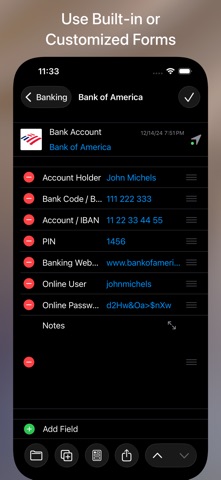
∙ Use our handy templates for
Credit cards
Bank accounts
User accounts
Plain-text
Images (from camera or photo library)
Videos*
Documents*
Contacts
or easily create your own custom forms
∙ Add comments to any item
∙ Change, move and sort folders and items in a simple way
∙ Launch Safari directly from web addresses stored in Safe +
∙ Make telephone calls on your iPhone directly from numbers stored in Safe +
∙ Create encrypted backups for data security and to transfer or sync across devices
∙ Restore encrypted backups to a new or replacement device
* In-app purchase available for various document types.
(Video, PDF, RTF, TXT, Pages, Numbers, Keynote, Word, Excel, PowerPoint)