Reimagine the way you collect and track your receipts. Introducing QuickReceipts, a mobile app designed to help you collect both your paper and email receipts.
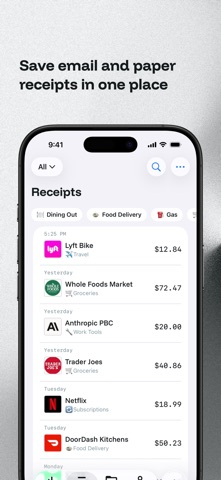
QuickReceipts is the only receipt tracking app that allows you to seamlessly scan your paper receipts and automatically import email receipts directly from your inbox. This app saves you valuable time by saving all of your receipts in one place.
The goal of QuickReceipts is simple: to help consumers go paperless with receipts. Paper receipts are a hassle to manage - they’re easy to lose track of and take up space in your pocket, purse, and drawer. Easily save them to QuickReceipts with a couple simple steps.
Alternatively, you can eliminate the need to snap pictures of paper receipts and start automating the way you collect and organize your receipts. You can automatically import your email receipts* directly into QuickReceipts. We utilize the latest iPhone capabilities to process receipts on your device, ensuring your data stays safe and private on your device.
QuickReceipts is free to use, but you can upgrade to QuickReceipts Pro for up to 100 custom tags, secure cloud backup, and multi-device access. Perfect for freelancers, consultants, and anyone managing receipts across multiple projects.
Features:
- Access your paper and digital receipts in one place
- Scan paper receipts and use our on-device processing to extract vendor, address, total, tax, tip, date, and time
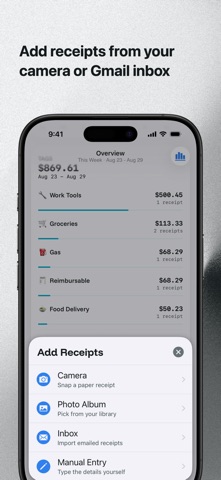
- Upload pictures of paper receipts from your photo album
- Manually create receipt entries
- Automatically sync your last month of receipts in your inbox
- Import additional email receipts as needed
- Get notified of new email receipts in your Gmail inbox
- Search your inbox and import emails directly from the app
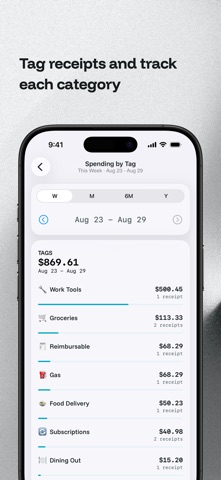
- Create customized tags to categorize purchases (up to 10 free, 100 with Pro)
- Multi-select and bulk edit multiple receipts
- Add notes and flag receipts for easy reminder
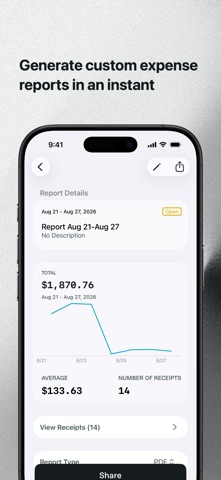
- Create expense reports by date range and tags
- Export receipts by PDF, CSV, and ZIP file
- Quick share receipts using a share sheet
- Filter and sort your receipts
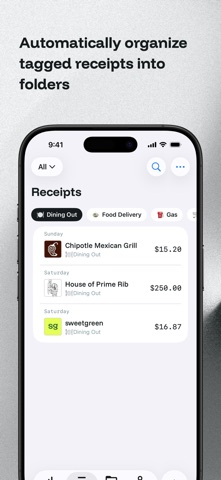
- Create folders to organize your receipts
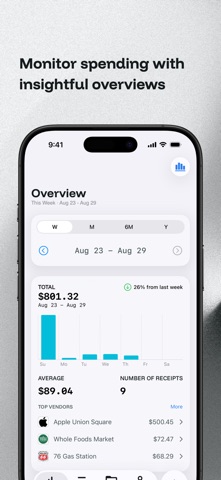
- Track spending with helpful spending overviews
- Look at purchases by vendor
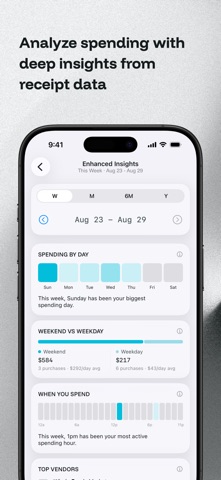
- Enhanced Insights to help you dig deeper on spending trends
- Custom reminder notifications
- Utilize Quick Insights, our on-device purchase intelligence
- Modernized design with functionality familiar to iOS users
- Consumer privacy friendly with on-device processing and intelligence
* Note: QuickReceipts is only compatible with Gmail inboxes at the moment. Access to different email inboxes will be released down the road.
QuickReceipts is compatible with Gmail inboxes and available exclusively for iOS devices in the United States and Canada. We’re always updating and adding new features to the app, so stay tuned for more!
The future of receipts is here - download QuickReceipts now and get started for FREE. If you want more from the app, QuickReceipts Pro is available. What you get from Pro:
- Secure cloud storage with automatic backup
- Up to 100 custom tags to organize receipts your way
- Access receipts from multiple devices
- Batch import more receipts from your inbox
- Enhanced insights to dive deeper into spending patterns
Pro is available for $6.99 per month or $69.99 per year. Subscriptions renew automatically - cancel anytime. Learn more about Pro on our website.
Ready for a better way to manage your receipts? Get started today!
Have a feature request or need help? Email us at support@quickreceipts.co
Apple standard EULA: https://www.apple.com/legal/internet-services/itunes/dev/stdeula/
QuickReceipts Terms of Use: https://quickreceipts.co/terms