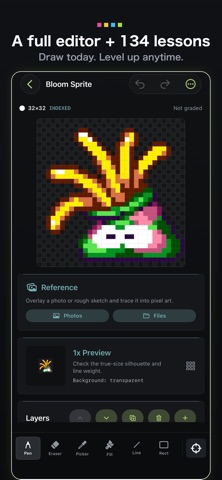
Draw it. Animate it. Master it. PixelHub is a full-featured pixel art editor — layers, animation, 32-color indexed palettes — with a complete 134-lesson course built in. Fully offline, no account, optimized for iPhone and iPad.
A Serious Tool in Its Own Right
The editor isn't a teaching accessory — it's a pixel art tool you can use every day:
Drawing Tools: Pencil (1–4 px brush), eraser, eyedropper, flood fill, line, rectangle, color replacement.
Selection & Transform: Rectangular select, freehand lasso, magic wand, copy/cut/paste, move/flip/rotate.
Layers: Build artwork part by part without fear.
Color Control: Indexed color (up to 32 colors), HSV palette editing, palette-aware undo/redo.
Palettes & Import: Classic palette presets (PICO-8, DawnBringer and more) plus GPL palette import/export.
References & Canvas: Reference-image underlay for drawing from photos or sketches, custom canvas sizes (non-square too), whole-canvas flip and rotate.
History & Export: 200-step undo, autosave, crisp integer-scale PNG export.
Animation is first-class: A full timeline with add/duplicate/reorder, 17–1,000 ms frame holds, loop ranges, and previous/next onion skins — enough to build walk cycles and attack motions, not just GIF loops.
Game-ready export: Sprite-sheet PNGs with timing/loop JSON, plus import hints for Unity, Godot, and the web. Draw a sprite, drop it into your game.
When You Want to Level Up: 134 Lessons
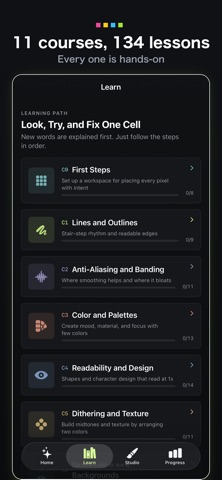
“I can draw, but I'm not getting better.” That's what the course is for. From placing your first dot to anti-aliasing, dithering, isometric art, and animation: 11 courses, 134 interactive units, each following the same structure — a goal, a plain-language explanation, three concrete steps, and a completion check. Every technical term is defined before it's used.
Each unit includes three hands-on exercises (402 total):
Repair: Fix a broken example and feel what matters.
Finish: Complete a real CC0-licensed artwork.
Create: Draw your own original at the same scale.
Exercises come with tool restrictions, edit budgets, and staged hints, so you can't just trace the answer. Ten chapter exams (100 questions, 80 to pass, unlimited retakes) confirm what you've learned.
Feedback That Explains Itself
Your work is checked on the spot for what actually matters in pixel art: color count, palette separation, contrast, readability, dithering, jaggies, banding, stray pixels, perspective axes, and cleanup — with the reasoning spelled out in plain words.
No vague AI scores: every note is rule-based and actionable. The anti-aliasing lessons even visualize brightness transfer between neighboring pixels in real time, making visible what experts do by feel.
Eight Capstone Projects
Icons, creatures, characters, scenery, isometric props, a game-screen mockup, an eight-frame action sequence, and a graduation piece — each with milestones and self-review rubrics. Finish with a portfolio, not just knowledge.
Built to Respect You
100% offline — every feature works anywhere.
No account; your art and progress stay on your device.
Optimized for iPhone and iPad, with a three-column workspace in iPad landscape.
Rights-cleared — all bundled teaching art is documented.
From today's doodle to your first game sprite — PixelHub.