Turn photos and paper into clean, shareable PDF documents in seconds. Snap a page, pick a picture from your photos, or use Smart Scan to find the edges automatically, then export a tidy PDF you can share, save to Files or print.
No account, no sign-up: your documents stay on your device.
SCAN OR PICK PHOTOS
• Smart Scan finds the page edges and straightens them for you
• Take a photo with the camera or choose one from your photo library
• Every new scan is named automatically, rename it whenever you like
EDIT EVERY PAGE
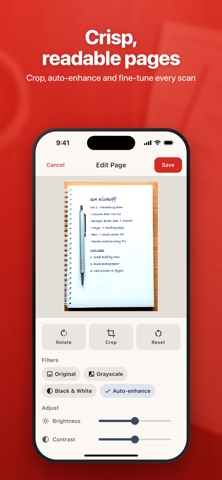
• Rotate pages with one tap
• With Premium: Crop, Grayscale, Black & White and Auto-enhance for crisp, readable pages
• With Premium: fine-tune brightness and contrast
• Edit or retake any saved page later, in the same position
ORGANIZE YOUR DOCUMENTS
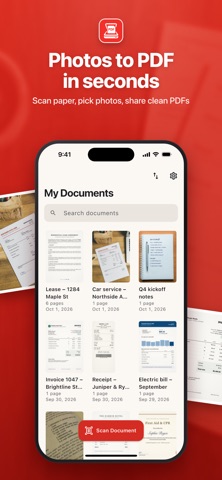
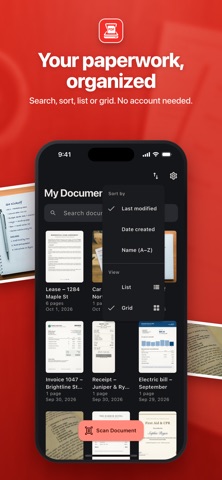
• All documents in one library with thumbnails, page counts and dates
• Search by name, sort by last modified, date created or name
• Switch between list and grid view
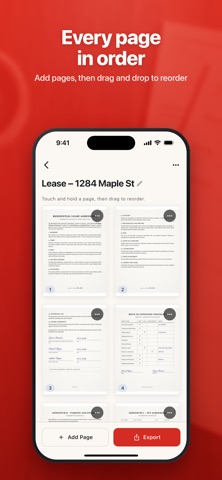
• Drag and drop to reorder pages
EXPORT PDF YOUR WAY
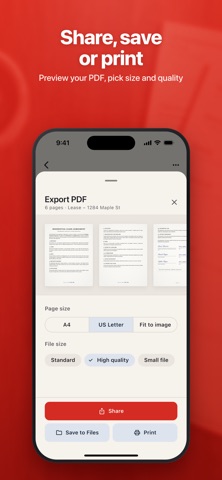
• Preview the whole PDF before you send it
• Share by Mail, Messages, AirDrop and more, save to Files or print
• Page size: A4, US Letter or Fit to image
• With Premium: High quality or Small file for sharper scans or lighter attachments
EXTRACT TEXT
• With Premium: recognize the text on your pages on the device, then copy or share it
DESIGNED FOR EVERY SCREEN
• Works on iPhone and iPad, with a two-pane layout on iPad that keeps your library beside your document
• Light and dark mode, following your system setting
ABOUT PREMIUM
Premium is an optional auto-renewable subscription. Payment is charged to your Apple Account when you confirm the purchase. The subscription renews automatically unless it is canceled at least 24 hours before the end of the current period. You can manage or cancel it anytime in your Apple Account settings.
From receipts and homework to contracts and notes, Photo to PDF keeps your paperwork a tap away.
FREE FEATURES
• Create 10 new documents a day, plus 3 more by watching an optional ad
• 1 page per document, up to 5 pages with optional ads
• Smart Scan for 3 pages a day
• Take photos or choose one picture at a time from your library
• Rotate pages, edit or retake saved pages
• Reorder pages by drag and drop
• PDF preview, share, save to Files and print
• A4, US Letter or Fit to image page size
• Search, sort and list or grid view in your library
• PDFs carry a small watermark, removable for one export by watching an optional ad
PREMIUM FEATURES
• Unlimited new documents every day
• Unlimited pages per document
• Import several photos at once
• Unlimited Smart Scan with multi-page capture
• Crop pages
• Grayscale, Black & White and Auto-enhance filters
• Brightness and contrast controls
• No watermark on your PDFs
• High quality and Small file PDF options
• Extract text from your scans
• No ads
Privacy Policy: https://www.metko.org/scannerpdf/privacy.html
Terms of Service: https://www.apple.com/legal/internet-services/itunes/dev/stdeula/