PhotoCut is an easy-to-use design studio and photo editor. No design experience required. From online selling to digital marketing to social media posting, PhotoCut is here to help. Get your design superpowers today!
Seamlessly create, edit, and manage perfect product shots with just a few taps.
Get Creative
Create flyers, posters, invitations, cards, collages, logos, memes, profile pics, product photography, and stickers.
Powerful Editing & Design Tools
• Remove the background from photos.
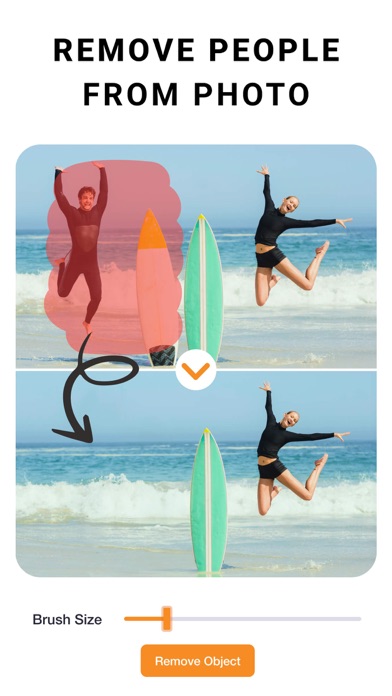
• Remove people & objects from any photo.
• Change backgrounds behind models. Create various looks and scenes without a reshoot.
• Swap backgrounds behind products for creating high-quality, professional product images.
• Change the background of your photo with a quick touch.
• Effortlessly cut out images like a pro using select, eraser and cutout tools.
• Create professional-looking social media posts, flyers or posters for your business.
• Save time by instantly editing multiple photos.
Image Correction & More
• Adjust and Customize Photos: Change contrast, exposure, saturation, fade, sharpness, vibrance, warmth, tint, shadows, highlights, and blur.
• Apply stunning filters to your photos to add a “wow” effect.
• Add special effects to the edges of your photos using outline and shadow tools.
• Perfectly align photos, text, and any element with guided positioning, or auto alignment.
• Create custom edge styles for photos with the outline and shadow tools.
• Curve your text to match an arc or a circle.
• Edit and modify text with alignment, letter and line spacing.
• Position elements precisely with the nudge tool.
Upgrade to PhotoCut Plus
Create professional looking designs in seconds with Plus!
Try PhotoCut Plus with a free trial! You’ll only be charged if you decide to keep it after the trial. Cancel anytime before the trial ends to avoid any charges. PhotoCut Plus subscriptions are charged annually to your iTunes Account after your 7 day trial ends. Subscriptions will then auto-renew every month or year unless turned off at least 24 hours before the end of the current period. Your iTunes account will be charged for renewal within 24 hours prior to the end of the current period. To stop auto-renewal, visit Account Settings in iTunes after purchase.
- Terms of use: https://imagixai.com/terms.html
- Privacy policy: https://imagixai.com/privacy_policy.html
Please write to us at support.photocut@imagixai.com for any support queries.