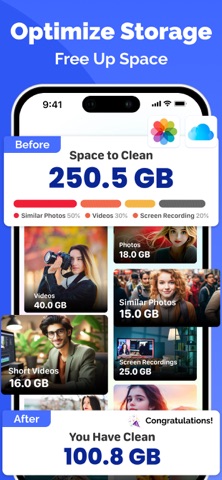
Running out of iPhone storage? Photo Cleaner · Duplicate Remover finds and removes everything eating your space, duplicates, blurry shots, large videos, old screenshots — in seconds.
Reclaim gigabytes with one tap. Keep only the photos that matter.
**SMART GALLERY CLEANER**
Scan your entire photo library instantly. Photo Cleaner detects duplicate photos, similar shots, blurry images, large videos, live photos, and old screenshots — and lets you delete them all in bulk. No more manually searching through thousands of photos.
**DUPLICATE & SIMILAR PHOTO REMOVER**
Find exact duplicates and near-identical photos shot in burst mode. Review side-by-side and keep the best one. Free up massive space without losing a single memory.
**VIDEO & LIVE PHOTO COMPRESSOR**
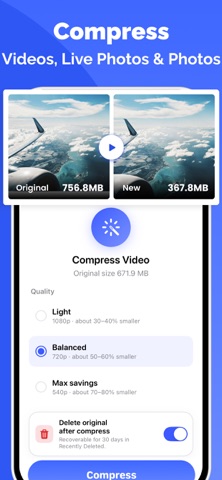
Compress large videos and live photos without losing quality. Choose Light, Balanced, or Max Savings compression — shrink file sizes by up to 80% while keeping your originals safe for 30 days.
**SWIPE TO CLEAN**
Browse your entire library with a swipe. Swipe left to delete, swipe right to keep — as easy as it gets. Review by Recent, On This Day, Live Photos, Selfies, or any date range.
**SORT & BROWSE YOUR WAY**
Find any photo fast. Sort by date, folder, location, or media type. Explore Moments, Recent shots, On This Day memories, and Selfies — all in one clean interface.
**DUPLICATE CONTACT CLEANER**
Find and merge duplicate contacts automatically. Clean up your contact list, remove incomplete entries, and keep your address book organized in seconds.
**CALENDAR CLEANER**
Remove duplicate and old calendar events quickly. Keep your schedule clean and clutter-free.
**PRIVATE VAULT**
Protect your personal photos with the built-in Vault. Move sensitive photos and videos into an encrypted, password-protected space — completely hidden from your main gallery. Your private files stay private.
**MORE POWERFUL TOOLS**
Screenshot Cleaner — bulk delete saved screenshots
Large File Finder — spot and remove heavy videos fast
Selfie Organizer — browse and clean selfies by person
People Albums — group and manage photos by face
Live Photo to Still — convert Live Photos to save space
Media Type Filter — sort by photo, video, screenshot, live
**WHY MILLIONS CHOOSE PHOTO CLEANER**
Clean up GBs in minutes, not hours
Safe — photos never uploaded, all processing on-device
No accidental deletions — review before you remove
Works with iCloud Photo Library
Simple, beautiful interface anyone can use
Download Photo Cleaner · Duplicate Remover free and see how much space you can reclaim today.
"Policy**
Privacy Policy :- https://drive.google.com/file/d/1YlOiVR3GxCrUFfJ_aH1xt8XHGCdaC4KL/view?usp=sharing
Terms :- https://drive.google.com/file/d/1umbhANZThWutmRu_DP4YFq04Km-qWNS_/view?usp=sharing