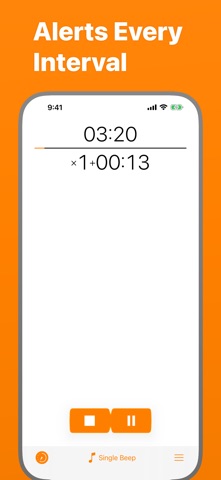
Keep track of time without being distracted by the device!
Simple and easy timer that repeats at your chosen interval.
FEATURES
- Vibration, if sound is off.
- Works in the background.
- 3 timer output modes: intervals, total time, countdown.
- You can cancel or pause the timer with help of a notification.
- Quick Start from icon.
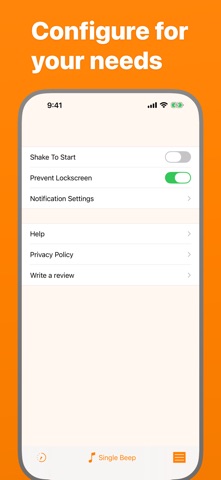
- Shake To Start - can be enabled in settings.
- Prevent Lockscreen - another useful setting, the screen will not lock, while the timer is running.
USE CASES
Here is a list of known use cases based on the real feedback:
Fitness and health:
- Stretching
- Stationary bicycle (interval training)
- On a treadmill
- For HIIT
- Jogging
- Timed medication
- Boxing
Cooking
- While frying potatoes
- Roasting steaks
- Checking an over or a grill to prevent burning
Learning & science
- Foreign language learning
- As a lab timer
- Periodic data collection
- Speech training
- Presentation timing
Other
- Mindfulness
- Communication
- To have a sense of time flying away :)
HELP
Q: Why the timer doesn't work in the background?
A: You should allow notifications.
Q: How to turn off the sound and turn on the vibration?
A: On the device, turn the Silent Mode on. (Side Switch)
Q: Alert is limited for 5 seconds!
A: Go to Settings app, then Periodic Timer > Notifications > Banner Style > Persistent.
Q: How to switch the Timer Output Mode?
A: To switch the Output Mode touch the timer display at the top of the screen.
Q: What is Shake To Start for?
A: Shake To Start setting allows to start/cancel the timer by shaking the device. Thus, you don't touch the screen, what can be useful while cooking, for example. In order for this mode to work, the app should be open.
If you still have questions or suggestions, you can visit the support page (https://goo.gl/forms/pggVBcaBxdW85EGE3), the Facebook group (http://www.facebook.com/groups/PeriodicTimer/) or you can email me (periodictimer.sup@gmail.com).
If you like the app - please, rate it!