Give every unit of money a job.
Pentos brings classic envelope budgeting to a modern ledger: assign what you have to category envelopes each month, spend against them, and watch what's left roll forward. You buy it once. It works entirely offline. Nothing about your money ever leaves your iPhone.
WHY ENVELOPES
Budgets fail when they're forecasts. Envelope budgeting only deals in money you already have: fund Groceries, fund Rent, and when an envelope runs dry, the shortfall is charged back against next month, so the numbers stay honest. Categories can carry their debt forward instead if you prefer.
YOUR LEDGER, COMPLETE
- Accounts with running and cleared balances, on- or off-budget
- Fast entry with payee autocomplete, split transactions, and transfers that stay mirrored across both accounts
- Statement reconciliation that locks rows once they match your bank
- Search, rich filters, #tags, bulk edit, and a flag on anything still uncategorized
RULES THAT DO THE TYPING
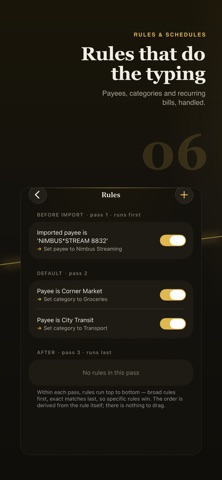
Teach Pentos once: rules rename messy payees, set categories, and run on every import. Apply a new rule back through history in one tap. Payee merge tidies duplicates and never touches a reconciled row.
SCHEDULES AND GOALS
Scheduled transactions post themselves, or wait for your OK, and never drift: Jan 31, Feb 28, Mar 31. Give any envelope a target: a fixed amount, a save-by date, a share of income, and more. Then fund every goal in one tap.
TWO WAYS TO BUDGET
Strict envelopes, or a lighter tracking mode that simply shows what you saved or overspent each month. Switch any budget file between the two at any time without losing data.
SEE WHERE IT GOES
Net worth, cash flow, spending breakdowns, comparisons, and a calendar heat map, plus a dashboard you arrange yourself from saved report cards. A privacy switch redacts every amount when someone is looking over your shoulder.
UNDO ANYTHING
The undo arrow takes it back: edits, bulk changes, deletions. Hold it for a labeled history. Shake to undo works too.
BRING YOUR BANK WITH YOU
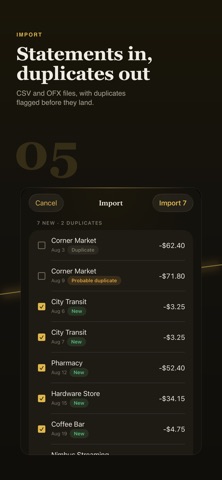
Import CSV, OFX/QFX, or QIF statements. Pentos learns each account's column layout, catches duplicates automatically, and re-importing the same file is always safe.
PAY ONCE, KEEP IT FOREVER
Pentos is not a service. There is no subscription, no account to create, and no server your budget depends on. Buy it once and it keeps working.
LEAVE WHENEVER YOU LIKE
One tap exports your entire budget as a portable backup file you can restore on any iPhone running Pentos, or as plain CSV for spreadsheets. It's your data, and you can take it with you anytime.
PRIVATE BY DESIGN
Pentos makes no network connections. No analytics, no telemetry, no cloud. Its privacy label reads "Data Not Collected" because there is nothing to collect.
Terms of Use: https://www.apple.com/legal/internet-services/itunes/dev/stdeula/
Privacy Policy: http://policy.pentosbudget.com