StoreIntel
AppsTop ChartsTrendingKeywordsMy Apps
Not affiliated with Apple Inc. App Store is a trademark of Apple Inc.Top chartsSupportTermsPrivacy

PDFixy: PDF Editor

Inderjeet Singh · Business · 11mo old

Free
◆ ProTrack this app App Store

Performance · Worldwide

Est. downloads / month · WW

<5K

Below chart threshold

Est. revenue / month · WW

<$5K

Below chart threshold

Rating · WW

—

0 ratings

Chart position

Rank history — US · Top Free

Apple's Top Free chart — free apps ranked by recent downloads.

Top FreeTop Grossing

Ratings count — US

0
◆ Pro1 chart locked

See the numbers behind the rankings

  • Keyword RankingsWhich App Store searches it ranks for, and where
Unlock everything

Listing

About

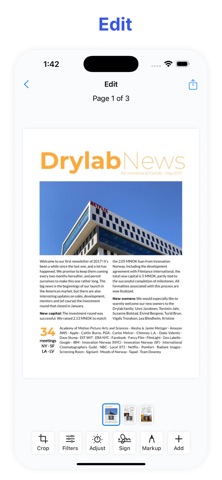
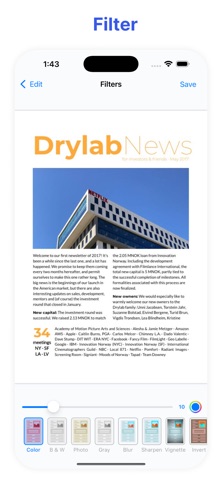
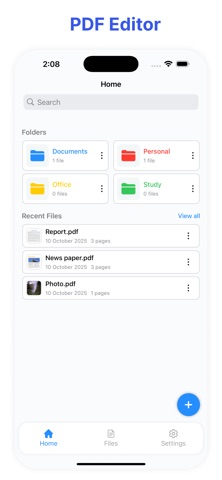
PDFixy – Edit, Sign & Share Your PDFs PDFixy is a professional PDF editor that lets you easily edit, customize, and share your documents. Designed for simplicity and power, it offers all the essential tools to manage your PDFs effectively. Key Features: Edit PDFs - Add or modify text, insert images, and update content directly within your PDF files. Crop and Enhance Pages - Trim pages, apply filters, and adjust brightness and contrast to improve document appearance. Sign and Stamp - Add digital signatures or create custom stamps to mark approvals or important notes. Add Watermarks - Protect your documents with personalized watermarks for branding or confidentiality. Add Images, Text, and Photos - Insert additional content such as pictures, scanned images, or text onto existing pages. Share Easily - Export and share your files in multiple formats, including PDF, Image, and ZIP, with just a few taps. Privacy Policy: https://inder663.github.io/PDFix/privacy.html Terms of Use: https://inder663.github.io/PDFix/terms.html
Released
Nov 3, 2025
Category
Business
Content rating
4+
Price
Free
In-app purchases
No
WWUSGBDEJPINBR

No chart data

No rank history yet for this selection.

→

Screenshots

5
PDFixy: PDF Editor screenshot 1PDFixy: PDF Editor screenshot 2PDFixy: PDF Editor screenshot 3PDFixy: PDF Editor screenshot 4PDFixy: PDF Editor screenshot 5