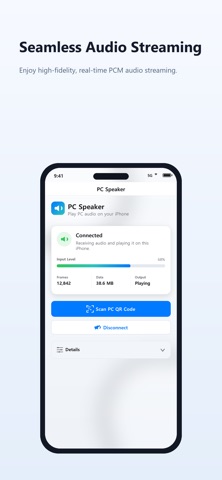
Turn your iPhone or iPad into a high-fidelity wireless speaker for your PC.
Need a temporary speaker for your computer? Don't have a Bluetooth adapter, or simply want to listen to your PC audio from across the room? PC Speaker streams your computer's system audio directly to your iOS device over local Wi-Fi with ultra-low latency and crystal-clear quality.
REQUIRED COMPANION APP: To use this application, you must download the companion sender program on your PC by visiting "https://speaker.eggmango.com/". This desktop program is the essential module required to capture and transmit your PC's audio to your mobile device.
KEY FEATURES
- Instant QR Code Pairing No need to type complex IP addresses or configure ports. Just run the companion app on your PC, scan the QR code displayed on the screen, and connection is established instantly.
- High-Fidelity Audio Streaming Experience uncompressed Float32 PCM stereo audio at 48,000 Hz. Enjoy clean, high-quality computer sound directly through your iPhone's speakers or connected headphones.
- Ultra-Low Latency and Stability Optimized local WebSocket transmission ensures minimal audio delay, making it perfect for watching videos, listening to music, or monitoring PC audio output.
- Real-Time Diagnostics and Control Keep track of your audio stream status. The detailed in-app dashboard shows real-time stats like frames received, network data throughput, output routes, volume, and playback gain controls.
- Universal Desktop Support Works seamlessly with the lightweight companion sender app on both Windows and macOS systems.
HOW TO USE IT
1. On your PC (Windows or macOS), go to "https://speaker.eggmango.com/" to download and run the required companion PC Speaker Sender program.
2. Open this app on your iPhone or iPad.
3. Scan the QR code displayed on your PC screen.
4. Your PC audio will immediately start playing through your iOS device!