The ParkHouston app, powered by ParkMobile, gives you a smarter way to park in Houston. Easily pay for on-street and off-street parking right from your mobile device. You can also reserve parking ahead of time in lots, garages, venues, airports, and universities across the country. You can use the ParkHouston app in over 500 other cities across the country, including Boston, San Francisco, Washington, D.C., Atlanta, Chicago, Miami, New Orleans, Dallas, St. Louis, Minneapolis, Pittsburgh, Philadelphia, and more.
Why Use ParkHouston?
• Skip the meter and easily pay for parking from your mobile device
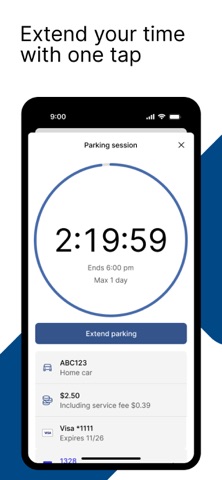
• Extend your parking duration remotely from the app
• Get alerts so you know when your parking session is going to expire
• Reserve parking spots ahead of time to save time and money
• Use the app in over 3000 locations coast-to-coast including venues, airports, and universities
How to Set Up Your Account
• Download the ParkHouston app and create an account with your email address and password
• Enter your license plate number and the state where your vehicle is registered
• Add your method of payment and start using the ParkHouston app
How It Works
On-Street and Off-Street Parking:
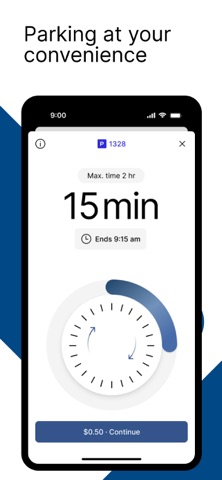
• Enter the zone number on the posted signs around the meter
• Select the amount of time you want to park and confirm your information
• Touch the “Start Parking” button to begin your parking session
• Extend time in the app if you are running late
Parking Reservations:
• Search for the area where you want to park and select the specific parking location
• Choose the date/time and complete your reservation
• Follow the instructions in your confirmation to redeem at the parking facility
App Features
• Customizable notifications delivered via email, text, and/or app
• Save your favorite parking locations for next time
• Store up to five cars in your account
• “Find my car” feature directs you back to the location where you parked
• Turn-by-turn directions to the parking garage where you reserved your spot
• Multiple payment methods available
About ParkMobile
ParkMobile, LLC is the leading provider of parking payment solutions in the United States, helping over 40 million people easily find, reserve, and pay for parking from their mobile devices.
Looking for Help?
At ParkMobile, we’re serious about customer service. We process nearly 500,000 parking transactions every day and we know that every now and then, something might go wrong. If you have an issue, we will do everything we can to make it right. Our customer service is 24/7/365. If you need help, here’s how to get in touch with us:
Web: https://ParkMobile.io/
Email: helpdesk@ParkMobile.io
Online Help Center: https://ParkMobile.zendesk.com/hc/en-us
Video Tutorials: https://www.youtube.com/playlist?list=PLkFsfUAHrnUc5jOm9XtjOmmJQt4YTTCyA
Twitter: https://twitter.com/ParkMobile
Facebook: https://www.facebook.com/ParkMobile/