On-Device AI puts chat, listening, transcription, notes, and research in one private app for iPhone, iPad, Mac, and Apple Vision Pro. Your data stays on your device.
Download a model once and keep working on a plane, on the subway, or without a signal. Chats, documents, recordings, and notes stay on your device. Online providers and web features are optional and work only after you enable them.
ONE APP, YOUR WAY
Open every workspace from a customizable Menu. Keep favorites under Pinned and everything else close by under Available.
AI CHAT
Chat with local or cloud models.
• Run local models from families such as Gemma, Qwen, DeepSeek, and Mistral, or connect your own provider account
• Browse, download, and manage models that fit your device, including ones for text, vision, reasoning, and tools
• Drop in documents, images, and scanned PDFs; approve private on-device OCR only when a PDF needs it
• Fork any conversation and compare several models on the same prompt
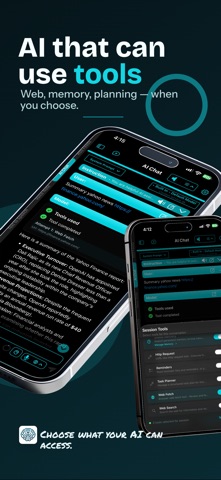
• Let the model use tools for calculations, web requests, documents, Calendar, and Reminders, and review proposed changes before they apply
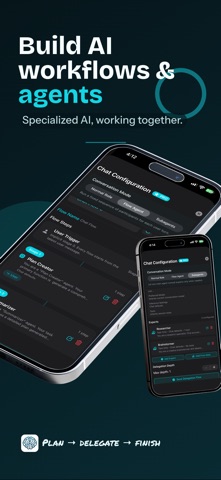
• Create reusable Agent Profiles, then add AI Skills, MCP servers, and tools from one clearer Agent Workflows setup
• Keep facts you repeat often in Global Memory
LISTEN LIBRARY AND RSS FEEDS
Read less, listen more.
• Turn PDFs, Markdown, plain text, web articles, and scanned books into a listening queue
• Scan photographed pages, correct the OCR the app runs on device, and keep each page with its spoken text
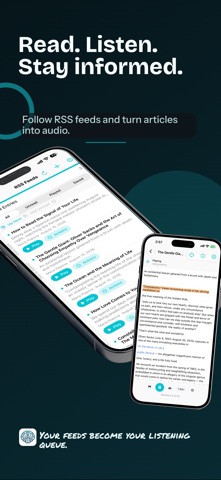
• Follow sites through RSS, Atom, and JSON feeds, then send articles to Up Next
• Choose Apple voices or local neural voices, follow along in the reader, and set a sleep timer
VOICE NOTE, VOICE TYPING, AND TEXT TO SPEECH
Speak instead of typing, and listen instead of reading.
• Record and transcribe meetings, lectures, interviews, and quick ideas
• Dictate with Voice Typing on Mac or the voice keyboard on iPhone and iPad
• Transcribe with Apple Speech, Whisper, Parakeet, Nemotron, Qwen3-ASR, MOSS, and other engines
• Turn text, or text captured from a photo, into audio with Apple voices, Kokoro, Supertonic, VoxCPM2, IndexTTS2, and other engines
• Export transcripts as text, subtitles, or Markdown
AI SEARCH AND AI BROWSER
Research with a second pair of hands.
• Search the web in a conversation and let the model read the results for you
• Browse with tabs, profiles, history, and downloads, then ask your model to read, assist, or act on the page
• Hand a task to the browser agent, watch each step, and take over whenever you want
KNOWLEDGE AND TEXT NOTE
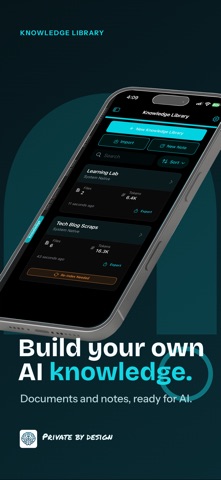
Give your AI your own material to work from.
• Add PDFs, text, Markdown, code, images, and website content to a private searchable library
• Write and edit Markdown notes in the app
• Import AI chats, voice notes, Text to Speech items, and AI Search results
• Tune retrieval and index edited content again
APP HELP
Ask how a feature or setting works. App Help answers from a guide that ships inside the app, keeps help out of your saved chats, and points to the right settings.
MADE FOR APPLE DEVICES
• Native layouts adapt from focused navigation on iPhone to category sidebars on larger screens
• Settings are grouped by purpose, including Voice Typing, Agent Workflows, Models & Storage, Privacy & Data, Memory, and—on Mac—Instant Messaging
• Widgets for Listen, Voice Note, Text Note, and Quick Actions
• Siri, Apple Shortcuts, App Intents, the Mac menu bar, and keyboard shortcuts you can customize
• Apple hardware acceleration for supported local models
• Browse chat, transcription, speech, and embedding models in one Model Library
• Store models internally, on an external drive, or on a shared volume, with separate tools for cleanup and recovery
• Interface in English, Dutch, French, German, Italian, Japanese, Spanish, Portuguese, and Traditional Chinese
EULA: https://www.apple.com/legal/internet-services/itunes/dev/stdeula/