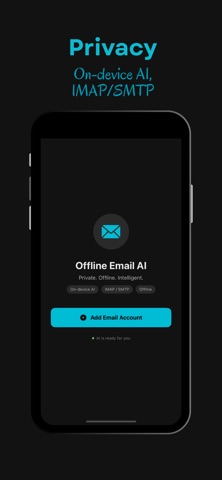
Offline Email AI brings private, on-device intelligence to your inbox. A compact language model runs entirely on your iPhone, so your messages never leave the device to be summarized, triaged, or drafted.
Connect any IMAP / SMTP account — Gmail, iCloud, Outlook, Yahoo, Fastmail, or your own mail server — and get:
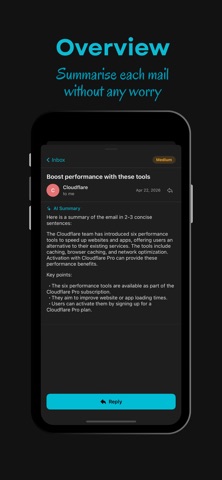
• One-tap inbox summaries
• Urgency scoring (High / Medium / Low)
• AI-assisted replies and drafts
• Voice-to-text composition
• PDF and image analysis in context
• Fully offline operation after the first launch
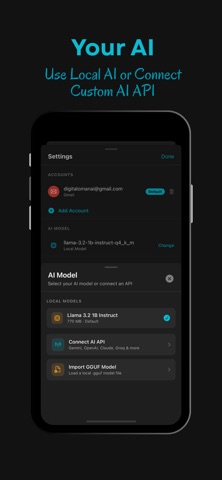
• Optional cloud models (OpenAI, Anthropic, Gemini, and custom endpoints) for users who prefer them — disabled by default
Why Offline Email AI?
Your email is personal. Most AI assistants ship every message you receive to a third-party cloud so a remote model can read it. Offline Email AI does not. The model lives on your phone. Credentials live in the iOS Keychain. There is no developer backend, no analytics SDK, no tracker, and no account to create.
Privacy by design
• No data leaves your device to the developer — ever.
• IMAP and SMTP traffic goes directly to your mail provider over TLS.
• Credentials and optional API keys are stored only in the iOS Keychain.
• You control every byte — uninstall the app to delete everything.
Built for Apple silicon
Offline Email AI is built on the open-source llama.cpp runtime and Llama 3.2, tuned for iOS. It detects your device's memory tier and loads the model with the right context size, batch size, and execution backend — so older iPhones stay responsive while newer A17 / A18 devices get full Metal acceleration.
Works with the mail you already have
No new inbox. No forwarding. No import. Add your existing address and the app connects to your provider through the standard IMAP and SMTP ports. You keep your mail where it is.
What's inside
• On-device language model (≈0.8 GB, bundled with the app)
• Native IMAP and SMTP client with TLS
• Encrypted local cache of message bodies
• Compose, reply, forward, save-draft, delete
• Inbox triage with per-email urgency tags
• Markdown rendering of AI output
• Dark and light themes
No subscriptions. No ads. No tracking.
Get to inbox zero without giving your email to a stranger.
Disclaimer:
1. Third-party / trademark disclaimer — not affiliated with Google, Apple,
Microsoft, Yahoo, Fastmail, etc. (addresses Guideline 5.2 — Intellectual
Property).
2. AI-output accuracy disclaimer — output "may be inaccurate, incomplete,
biased, or out of date"; user is responsible for what they send. (Addresses
Apple's generative-AI guidance and general fitness-for-purpose.)
3. Third-party ToS pass-through — your mail provider's and any optional cloud
LLM provider's terms apply; the developer has no visibility into those
relationships.
4. Service dependency — app requires an existing IMAP/SMTP account and doesn't
provide hosting.