Native tmux for iPhone and iPad, built for AI coding agents running on your host.
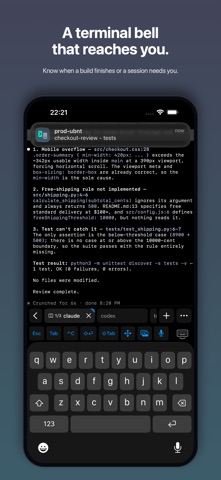
Muxly is a native tmux client for developers who run Claude Code, Codex, OpenCode, and similar agents on a remote machine. Your agents keep running on your host even when you close the app or lose your connection. Muxly notifies you when they finish or need input.
Muxly connects directly to your host over SSH. Pick up your existing sessions, follow every window and pane from your iPhone or iPad, and receive an encrypted bell notification when a build finishes or an agent needs you.
TMUX THAT FITS YOUR WORKFLOW
• Create, rename, reorder, and close real tmux windows from native tabs.
• Switch panes with the iPhone pane picker or work with your tmux layout on iPad.
• Resume your last session, choose an existing one, or start fresh.
• Switch sessions over a live connection.
• Use your configured tmux prefix and familiar shortcuts.
• Return to the same server sessions from your other tmux clients.
THE BELL FOLLOWS YOU
Step away while your work runs. When a program rings the terminal bell, optional push notifications can reach you even after Muxly closes and SSH disconnects.
Configure builds, scripts, or coding agents to ring when they finish or need input. Session and window details are end-to-end encrypted.
FILES AND EDITING
• Browse and manage remote files over SFTP.
• Upload from Files or Photos, download to Files, and save supported photos and videos to Photos.
• Edit code and configuration files with built-in syntax highlighting.
• Keep your file browser and unsaved edits available while switching terminal tabs.
• Share photos and screenshots with coding agents in just a few taps.
A TERMINAL MADE FOR MOBILE
• GPU-accelerated rendering and momentum scrolling.
• Precise text selection, copy and paste, and terminal search.
• A customizable keyboard toolbar with shortcuts, snippets, sticky modifiers, arrows, and F1–F12.
• Hardware keyboard support.
• Editable voice dictation on iOS and iPadOS 26 or later.
• 12 monospace fonts, 4 themes, adjustable text size, and up to 1,000,000 lines of scrollback.
DIRECT SSH TO YOUR HOSTS
• Password and Ed25519 key authentication.
• Generate or import Ed25519 keys, or create Secure Enclave keys protected by Face ID or Touch ID.
• Local, remote, and dynamic SOCKS port forwarding.
• Host key verification, startup commands, environment variables, and keep-alive settings.
• App Lock with Face ID or Touch ID.
No Muxly account, ads, or tracking. SSH traffic goes directly to your servers. Credentials are stored in the iOS Keychain; Secure Enclave private keys stay on the device.
FULL ACCESS
Connecting requires a monthly or yearly subscription, or a one-time lifetime purchase. You can start for free with a two-week free trial.
REQUIREMENTS
iOS or iPadOS 18 or later and an SSH server. Native tmux integration requires tmux 3.2 or later on the server. Optional bell notifications also require openssl, curl, and outbound HTTPS. Plain SSH works without tmux.
Terms of Use: https://muxly.sh/terms
Privacy Policy: https://muxly.sh/privacy