Copying a textbook into a notebook eats the time you meant to spend memorizing it. And the words you did get down start to blur a few days later.
Memento takes the copying off your hands and brings each card back just before you would forget it.
— Snap a page, get the cards
Photograph a textbook page and the words and sentences on it are sorted into a set of cards in one pass. Photos from your library, text you've copied, and PDFs work the same way, including long PDFs of 10+ pages. In a vocabulary folder each card gets a word, a meaning and an example sentence; in a knowledge folder, a concept and an explanation.
— Ask when you get stuck
Stuck on something while you study? Ask right there. Try "How do I say 'rain on someone's parade' in Spanish?" and you get the meaning with an example, plus a draft card under the answer. Only the cards you tap Save on go into a folder.
— Type the word, AI fills in the rest
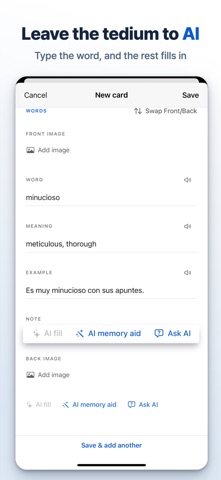
When you make a card yourself, type just the word and tap AI fill. The meaning and an example sentence are filled in for you. You can add a photo to either side of a card, too.
— Back right before you forget
Every card gets its own next review date. Cards you know well come back less often and shaky ones more often, so the same study time goes to your weak spots. To review, flip the card and tap Again, Hard, Good or Easy. Turn on reminders and you'll get one at the time you choose, only on days with cards due, telling you how many are waiting.
— On your Lock Screen
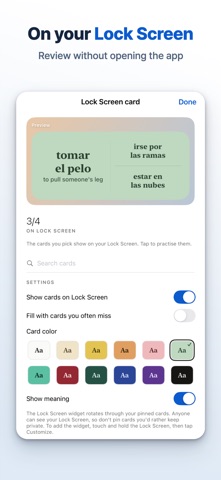
Pin up to four must-know cards to the Lock Screen. Each shows the word and its meaning without opening the app, and a tap takes you straight into practice. You can also let the cards you miss most fill those spots automatically.
— Paced to your exam date
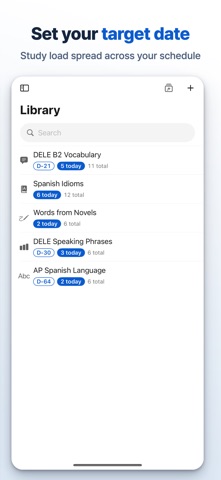
Set a target date on a folder and the number of new cards per day adjusts so you get through the whole folder by then. Days left and exam readiness show right on the folder.
— Other ways through the same cards
Type answer has you write the answer before you see the back. Autoplay moves through the cards on its own, and Match turns a folder into a matching game that tracks your time and best record and lets you replay the cards you missed. Cards can be read aloud, too.
— See where you stand
Statistics show your current level, your recent trend and how well you know each folder. You can also review only the cards you keep missing.
— Import and sync
Anki decks (.apkg) import as well (text only; images and audio are left out). Folders, cards and review history stay in sync across iPhone and iPad signed in to the same iCloud account, with no separate app sign-in.
— Memento Pro
The free plan already lets you ask AI questions and make cards from your material. Pro raises your AI limits and removes ads. Reviews, target dates and statistics are the same on free and Pro. Choose a monthly subscription with a 7-day free trial, or a one-time Lifetime purchase.
Pro Monthly is an auto-renewable subscription. Payment is charged to your Apple Account when you confirm the purchase, or when the free trial ends if one applies. It renews automatically unless canceled at least 24 hours before the end of the current period. Manage or cancel anytime in your Apple Account settings. Lifetime is a single payment and does not renew.
Text, photos and PDFs you give the AI features are sent to an external AI service to generate answers and cards. Details are in the Privacy Policy.
Terms of Use (EULA): https://www.apple.com/legal/internet-services/itunes/dev/stdeula/
Privacy Policy: https://hyunsanglabs.com/apps/memento-notes/privacy