MaxScan turns your iPhone into a fast, private document scanner. Point the camera at a page and it is detected, captured and perspective-corrected automatically — a multi-page document is ready to share as PDF in seconds. MaxScan is free to use: scan as much as you like, with no watermark and no page limit.
SCAN ANYTHING
• Automatic edge detection with perspective correction
• Adjust Frame: fine-tune the crop with draggable corners at any time
• Import photos — documents are detected and cropped automatically
• Color, grayscale and crisp black & white modes
• Add, reorder, rotate and delete pages whenever you like
SMART, SEARCHABLE LIBRARY
• Text recognition (OCR) on every page — search your documents by their content (Pro)
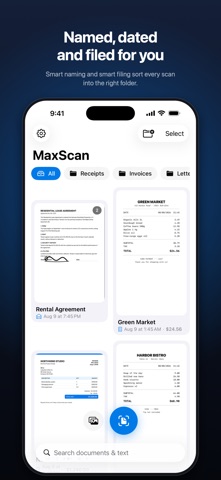
• Smart naming: scans title themselves from the recognized text (Pro)
• Automatic categories: receipts, invoices, ID cards, letters and notes (Pro)
• Smart filing sorts new scans into matching folders for you (Pro)
• Folders, merge, and a Recently Deleted bin with 30-day recovery
BUILT FOR RECEIPTS & EXPENSES
• Totals, currencies and dates are detected on receipts automatically (Pro)
• Export any folder as an expense CSV for spreadsheets and reports (Pro)
SIGN & ANNOTATE
• Draw your signature or highlight text right on the page (Pro)
• Markup stays editable — change filters or rotate without losing it (Pro)
SHARE IT YOUR WAY
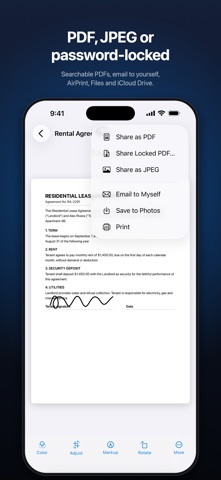
• PDF or JPEG, in three quality sizes
• Searchable PDFs — the recognized text travels with the file (Pro)
• Password-locked PDFs for sensitive documents (Pro)
• “Email to myself” with a single tap
• Save to Photos, print via AirPrint, AirDrop, Files and iCloud Drive
PRIVATE BY DESIGN
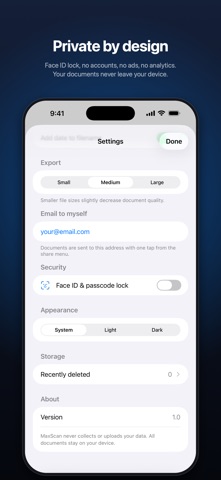
• Face ID & passcode lock
• No accounts, no ads, no analytics — your documents never leave your device unless you share them
FREE AND MAXSCAN PRO
• Free: unlimited scanning, edge detection, filters, multi-page documents, folders and PDF or JPEG export — no watermark, no page limit
• MaxScan Pro unlocks everything marked (Pro): search inside your scans, receipt totals with CSV export, password-locked PDFs, and signatures
• A one-time purchase, not a subscription — restore it any time on your other devices
Scan it once, find it forever — with MaxScan.