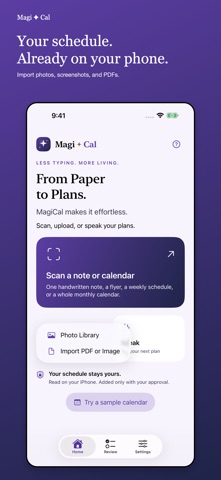
From Paper to Plans — MagiCal makes it effortless.
Turn notes, flyers, appointment cards, screenshots, and monthly calendars into editable events. One purchase includes the native iPhone and Mac apps. No subscription. Website access is separate.
SCAN, UPLOAD, OR SPEAK
Use the iPhone document scanner, choose images from Photos, import PDFs and images from Files, or type and paste a plan. Supported on-device English speech recognition is also available. Import up to 12 pages, with files up to 35 MB.
SEE THE YEAR CLEARLY
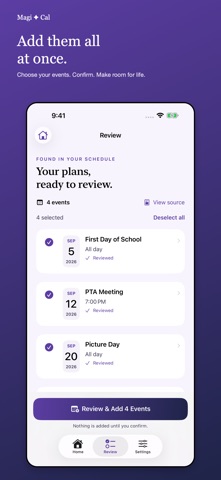
Review each event’s full date, including its year. When no year is written, MagiCal suggests the next occurrence, including today. Explicitly written years are preserved. Recognition assumptions remain visible for your review.
ONE FINAL REVIEW
Compare suggestions with the original. Edit titles, dates, times, locations, notes, reminders, and repeat rules. Select your events and confirm the final summary before anything is added. Possible duplicates require your decision. Missing times become all-day events.
CHOOSE YOUR CALENDAR
Works with writable calendars configured on your iPhone, including iCloud, Google, Outlook, and Exchange. If a calendar is missing, create an empty calendar in a supported account, follow account-setup guidance, or refresh the list. Creating a calendar does not add scanned events.
YOUR SCHEDULE STAYS YOURS
Image recognition and supported speech recognition run on your device. No MagiCal account, advertising, or analytics SDK. Unfinished drafts stay locally so you can resume them. Completed scans clear when you reopen MagiCal or start another scan. Events you add may synchronize through your calendar provider.
ALSO ON YOUR MAC
The included Mac app lets you import documents, review on a larger screen, and scan with your iPhone through a temporary QR link on the same trusted Wi-Fi network.
English schedule recognition. iOS 17 or later; the Mac app requires macOS 14 or later. Handwriting and unusual layouts may require corrections. Speech requires supported on-device English recognition; typed entry is always available. Always check event suggestions against the original.