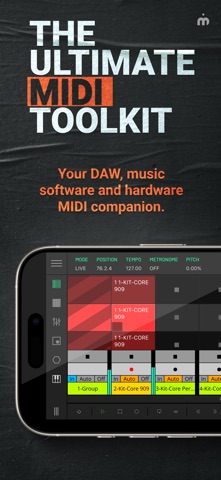
LK is a flexible remote control application for Ableton Live and MIDI devices, providing a wide range of features and functionality to enhance the production and live performance of electronic music. LK offers tight integration with Ableton Live using our free UBRIDGE desktop application, providing access and control of Ableton Live projects, with both wired and wireless connection options.
LK has extensive MIDI capabilities too, allowing for communication and control of any MIDI compliant software or hardware, even apps running on the same device thanks to virtual MIDI support and AUv3 integration too. LK is split into six unique modules, each available as a separate in-app purchase, offering great value that you can tailor to your specific needs.
LK is also capable of connecting with USB MIDI interfaces which allows you to interact with external gear.
To connect LK to your host computer you will need to download and install a free software utility called UBRIDGE on your computer. It is available for Windows and macOS and it can be downloaded from Imaginando website. See our setup guide for further details in LK’s product page.
MATRIX MODULE
- Live Mode - In Live mode, you can control almost every aspect of Ableton Live directly from LK. The app mirrors your session view, allowing you to launch clips, add tracks and scenes, arm, solo, and mute tracks, and adjust track monitoring, volume, pan, and cue settings on the master track. You can create and edit clips with the powerful built-in clip composer, featuring tools like scales, swing, humanize, horizontal and vertical mirroring, time-shifting notes, pitch swapping, transposing, and even chord and melody generation within a defined range. LK also enables device control within each track, offering a range of generic layouts for quick access and instant parameter adjustments, so you can modify settings without needing to interact directly with your computer.
- MIDI Mode - In MIDI mode, LK enhances workflow with a flexible, independent sequencing environment for streamlined composition and arrangement. Users can create and manage MIDI clips per track, arrange scenes, and send MIDI to other software or hardware. When loaded as an AUv3 in hosts like AUM, LK sequences and coordinates various instruments, perfect for complex setups and live performances. Essential editing tools like signatures, scales and transformative tools simplify MIDI editing, while automation and generative tools enable dynamic compositions. Follow actions and probability settings further smooth transitions, making performance arrangements seamless and spontaneous—all within a single, powerful interface.
PADS MODULE
- Get the MPC feel on your touchscreen with PADS, featuring an arpeggiator and a chorder. When working in Ableton Live mode it automatically maps drum rack pad names to each pad on the app - never miss a pad again. Use it in MIDI mode to quickly play other synth apps.
CONTROLLER MODULE
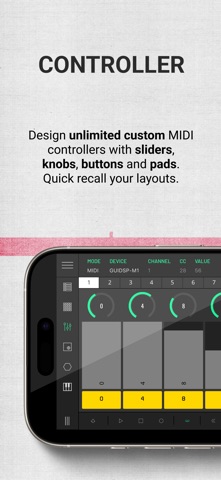
- Extensive control of 128 parameters with CONTROLLER. Use assignable and customisable knobs, faders, buttons and pads to control MIDI hardware, desktop and mobile DAWs - now with the power of AUv3 integration too.
X/Y MODULE
- Three dimensional parameter tweaking with X/Y PAD. This module can work with CC or NOTE events. In CC mode, a CC can be assigned per axis. In NOTE mode, X is pitch, Y is velocity and Z is Note ON/ Note OFF.
CHORDER MODULE
- Play chords like never before with the CHORDER module. Use this chord generator to build chords and lay them out according to your needs.
KEYBOARD MODULE
- KEYBOARD features 3-axis expression capabilities with scale and range controls. It also allows the possibility of mapping any Live or MIDI CC parameters to be controlled by the X and Y position within each of the keys, providing additional expression to the performance. It also has an MPE mode so you can use it with your favorite MPE compatible synths.