KlarScan turns paper into tidy PDFs and does the entire job on your iPhone or iPad. The app contains no networking code at all: no account, no cloud, no tracking, nothing to sign up for. Switch the device to airplane mode and everything still works.
SCANNING
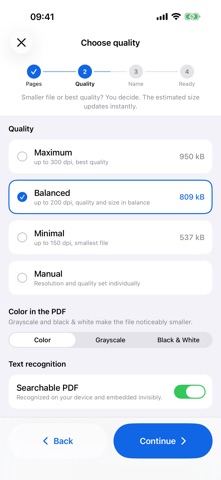
Capture runs through the iOS document camera, so edge detection and automatic capture behave exactly as you know them from the system. From there a four-step assistant leads to the finished PDF: check pages, choose quality, name the file, share. If the defaults suit you, three taps on Continue are enough.
EDITING PAGES
Reorder pages by dragging, rotate them, rescan a single page, or delete it. Tap a page to zoom deep into it. Undo is available everywhere editing happens.
PERMANENT REDACTION
Drag to cover an area, then adjust its corners and edges. Slanted shapes work too, which helps with a block of text that was scanned askew. Applying burns the shapes into the pixels of the page. There is no overlay and no PDF annotation with readable content underneath. The original file is deleted, and text recognition runs only afterwards. Redacted content therefore cannot come back in the PDF text or in search.
SEE THE SIZE BEFORE YOU EXPORT
Three presets (up to 150, 200, or 300 dpi) or your own values for resolution and JPEG quality. The size on screen comes from the same encoder that writes the export, not from a formula, and a before/after preview shows the exact artifacts the PDF will carry. Color, grayscale, and black & white belong to the export and stay changeable at any time.
SEARCHABLE PDFS
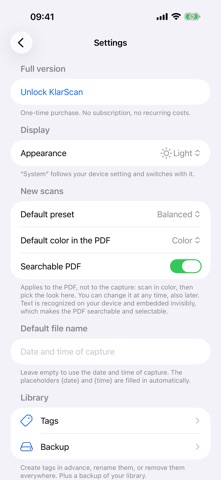
On request, KlarScan recognizes the text with Apple's Vision framework on device and places it invisibly over the image. The file stays small, and the text can be searched and selected in any PDF reader.
LIBRARY
Every export is saved to the library automatically. Full-text search covers titles, tags, and recognized text. Tags can be assigned, renamed everywhere, and removed everywhere, and several tags narrow the list further. Saved scans stay editable later, because the source pages are kept for exactly that.
BACKUP
The whole library can be written to a folder of your choice and read back from there: the Files app, iCloud Drive, or an external drive. Inside that folder every document is a plain PDF, readable with any app.
ON DEVICE, ENCRYPTED
Every file is written into the app's protected container with complete file protection, readable only while the device is unlocked. The camera is the only permission ever requested. There is no access to photos, location, or contacts.
IPHONE AND IPAD
On iPad the library sits as a sidebar beside the document, with keyboard shortcuts, pointer support, and drag to reorder. Available in 24 languages.
PRICING
Free to download, seven days to try everything, then a single unlock. One-time purchase, no subscription, no recurring costs. When the trial ends the library stays fully usable: view, search, share, export, delete. The unlock covers new scans and edits.
Provider: BYTEPOTATO UG (haftungsbeschränkt)