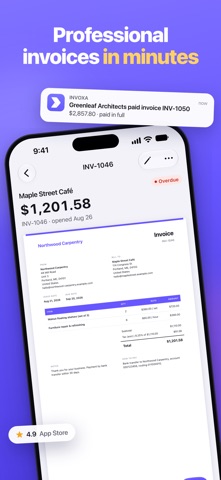
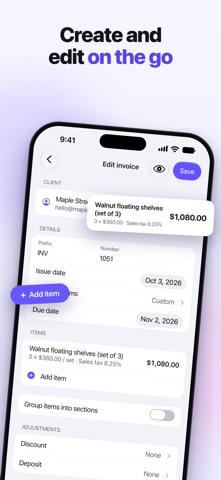
Create professional invoices and estimates in minutes, send them from your iPhone and get paid faster. Invoxa is the invoice maker for freelancers, contractors and small businesses, and it stays in sync with the Invoxa web app.
SAVE TIME
• Describe it: say or type what the job was, and a draft invoice or estimate fills in with the client, items, tax and due date
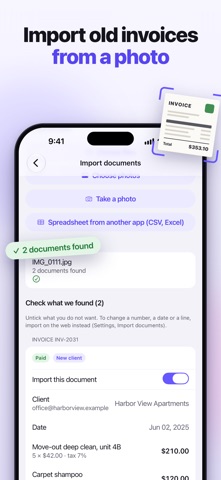
• Import your old invoices from PDFs, photos of paper invoices or spreadsheets (CSV, Excel) exported from other invoicing apps, with clients, items and payments
• Payment reminders: clients get a friendly email on the due date and after it, until the invoice is paid; estimates get signing reminders
• CC and BCC when you email a document
CREATE PROFESSIONAL DOCUMENTS
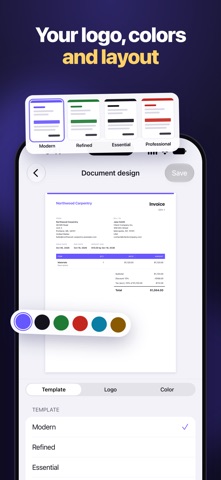
• Invoices, estimates and purchase orders with your logo, colors and layout
• Live preview: see the document exactly as your client will while you edit it
• Sections, discounts, taxes, shipping, deposits, notes and signatures
• Your own numbering, labels, columns and custom fields
• Duplicate a document to start the next one faster
SEND AND GET PAID
• Email documents to clients from the app, or share a link, a PDF or a printout
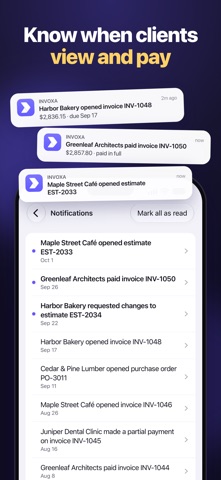
• See when a client opens a document
• Let clients pay invoices online by card through Stripe
• Record full and partial payments and keep the payment history
• Recurring invoices that repeat every week, every few weeks or every month
• Clients approve or reject estimates online; turn an approved estimate into an invoice
STAY ON TOP OF YOUR BUSINESS
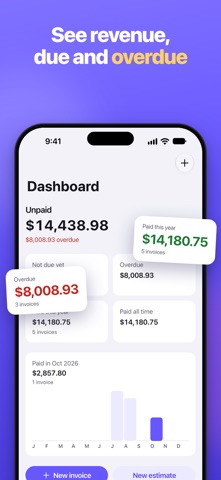
• Dashboard with revenue, outstanding and overdue amounts
• Push notifications when a client views, approves or pays
• Reports: sales summary, sales by client and by item, sales journal, taxes, outstanding balance by age
• Filter and sort your lists and export them to CSV
CLIENTS AND ITEMS
• Clients with several emails, phone numbers and addresses, with address suggestions as you type
• A catalog of your products and services with prices and units
ONE ACCOUNT ON PHONE AND WEB
• The same account on your iPhone and on the web at app.invoxa.com
• Sign in with Apple, Google or email
• Dark mode, no ads
INVOXA PRO
New accounts get 3 days of full access. After that you can still sign in and view your documents; creating, editing and sending documents and managing clients and items need an Invoxa Pro subscription, billed monthly or yearly.
Payment is charged to your Apple Account when you confirm the purchase. The subscription renews automatically unless you cancel it at least 24 hours before the end of the current period. You can manage or cancel it in your Apple Account settings.
Terms of Use: https://www.invoxa.com/terms-of-service/
Privacy Policy: https://www.invoxa.com/privacy-policy/
Questions or ideas? Write to support@invoxa.com