If hearing loss makes understanding phone calls challenging, try the InnoCaption app for free, fast, and accurate real-time call captions. InnoCaption is available at no cost to eligible users in the United States through funding from the FCC’s Telecommunications Relay Services (TRS) Fund.
**** New Update ****
• Custom Word List – Add custom words like names and specialized terms to improve real-time caption accuracy
• Picture-in-Picture – Keep captions visible in a floating window while using other apps or browsing the web during a call
REAL-TIME CAPTIONS FOR EVERY CALL
• Switch between live stenographers or Automated Speech Recognition (ASR) captions at any time during your call
• Available at no cost to individuals with hearing loss in the United States
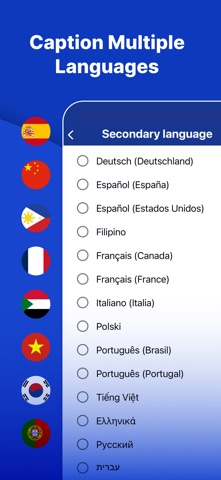
• Caption your calls in multiple languages, including Spanish, Chinese, Filipino, and more
• Make and caption 3-way calls
SEAMLESS CALLING & PERSONALIZATION
• Get captions for both incoming and outgoing calls
• Keep your existing phone number with our patented One Number technology
• Use InnoCaption like your regular phone dialer – no need to make calls through a 711 relay
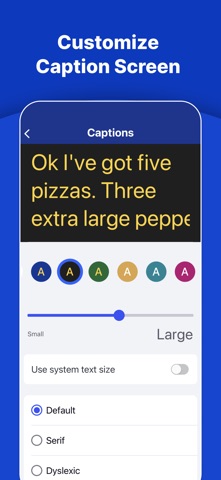
• Customize the InnoCaption app to fit your accessibility needs
TEXT-TO-SPEECH CALLING FEATURES
• Use AI Refine to turn short responses into complete sentences at the touch of a button
• Customize prewritten TTS Shortcuts for fast and effortless replies during calls
ACCESSIBLE TRANSCRIPTS & VOICEMAIL
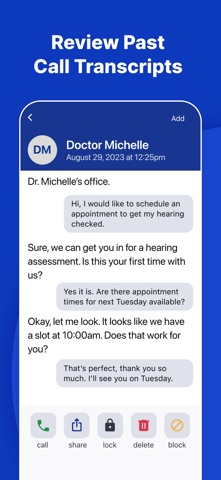
• Save and view transcripts of previous calls
• Generate concise AI-powered summaries of call transcripts
• Access and read fully captioned voicemail messages
SMART CONTACT INTEGRATION
• Easily sync contacts from your phone to the InnoCaption app
• Continue using your personal cell number by combining our caller ID and call-forwarding features
EMERGENCY CALLS & SPAM FILTER
• Built-in spam call filter blocks high-risk calls and provides notices for potential spam calls
• Make 911 emergency calls with captions*
*911 service may be limited or unavailable in the event of network disruptions or degradation, service connection or internet failure, or other circumstances. For more information, visit www.innocaption.com/calling-911
Cellular data plan or Wi-Fi is required to use the service.
FEDERAL LAW PROHIBITS ANYONE BUT REGISTERED USERS WITH HEARING LOSS FROM USING INTERNET PROTOCOL (IP) CAPTIONED TELEPHONES WITH THE CAPTIONS TURNED ON. IP Captioned Telephone Service may use a live operator. The operator generates captions of what the other party to the call says. These captions are then sent to your phone. There is a cost for each minute of captions generated, paid from a federally administered fund.
For more information, visit us at https://www.innocaption.com
For assistance, contact us at support@innocaption.com