StoreIntel
AppsTop ChartsTrendingKeywordsMy Apps
Not affiliated with Apple Inc. App Store is a trademark of Apple Inc.Top chartsSupportTermsPrivacy

∞ Color Light

David Richmond · Utilities · 10.7y old

Free
◆ ProTrack this app App Store

Performance · Worldwide

Est. downloads / month · WW

<5K

Below chart threshold

Est. revenue / month · WW

<$5K

Below chart threshold

Rating · WW

4.6★

5 ratings

Chart position

Rank history — US · Top Free

Apple's Top Free chart — free apps ranked by recent downloads.

Top FreeTop Grossing

Ratings count — US

5
◆ Pro1 chart locked

See the numbers behind the rankings

  • Keyword RankingsWhich App Store searches it ranks for, and where
Unlock everything

ASO moves

Metadata timeline

Name, subtitle, icon, screenshot and in-app price changes we’ve seen — what this developer is testing.

  1. Oct 14, 2026Icon
    ∞ Color Light previous icon→∞ Color Light new icon
  2. Oct 14, 2026Name
    Infinite Color ∞ Screen Light → ∞ Color Light
  3. Oct 7, 2026Name
    Infinite Color - Fast Chooser → Infinite Color ∞ Screen Light

Listing

About

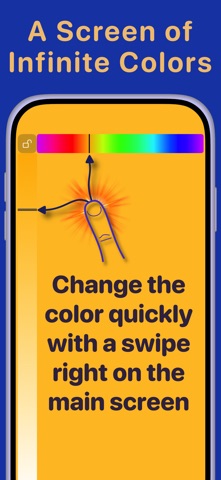
Turns your iPhone or iPad into a solid screen of color. Use as a timed nightlight, a low-light lantern, or just a simple color chooser. Adjust the hue, saturation and color brightness right from the main screen with an intuitive and unique input mode (just swipe with one or two fingers). Change the screen brightness with three fingers. Remembers screen brightness settings when you quit the app and restores the original brightness on restart. • Swipe the screen with one finger to change the hue and saturation. • Swipe with two fingers to change hue and color brightness. • Swipe with three fingers to change screen brightness. (Must have Accessibility-Zoom turned off) • Remembers screen brightness settings on app quit/restart. • Set the color to red and turn the screen brightness down for a stealthy flashlight! • Lock button to prevent accidentally changing the color. • Sleep timer for use as a night light. Plus, now has two types of widgets for quickly launching the app even from the lock screen:  • Standard widgets for the home screen or today view (the screen to the 'left' of the home screen • Accessory widget for the lock screen (goes right below the time display) - Instant access to a low-light lantern!

Released
Feb 10, 2016
Category
Utilities
Content rating
4+
Price
Free
In-app purchases
No
WWUSGBDEJPINBR

No chart data

No rank history yet for this selection.

→

Screenshots

4
∞ Color Light screenshot 1∞ Color Light screenshot 2∞ Color Light screenshot 3∞ Color Light screenshot 4