Imageless is a simple Safari Extension that allows you to easily block images & video, reducing data usage and speeding up browsing.
Features:
* Blocks images and videos at the network level
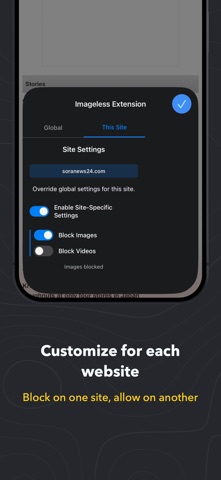
* Block globally or on a site-specific level
* Saves bandwidth and improves page load speed
* Works independently - block images, videos, or both
* Toggle on/off anytime from Safari's extension menu
* Option to lock media blocking settings behind Face ID/Touch ID or using a custom PIN. (Note that the extension itself can still be disabled from within Safari unless you also enable the 'Limit Adult Websites' option within Screen Time on your device.)
* No data is ever collected or sent anywhere by the extension
How to enable:
* Go to Settings → (Apps) → Safari → Extensions
* Find "Imageless Extension" in the list and toggle it ON
* In Safari, tap the Extensions button (puzzle piece icon) in the address bar to choose what to block
To prevent someone from disabling the extension:
Open Settings → Screen Time → Content & Privacy Restrictions → App Store, Media, Web, & Games → Web Content, then choose Limit Adult Websites. That setting also restricts changes to Safari extensions
Image Blocker operates entirely locally on your device. The extension:
* Processes web content locally in your browser
* Applies image blocking rules without sending data externally
* Stores preferences locally on your device only
* Does not communicate with external servers