iFiles is a powerful file manager for iPhone and iPad that helps you browse, view, and organize files on your device — plus a growing set of handy tools for everyday tasks. It supports photos, videos, PDFs, ZIP and RAR archives, and includes free Wi-Fi file transfer.
Key Features:
• File Browsing & Management
Quickly view, sort, and organize files and folders. Search across all your folders to find any file in seconds. Multi-select to share, move, or delete in batches.
• Multi-format Viewer
Preview images, videos, PDFs, text, and documents — and browse inside ZIP / RAR archives.
• Free Wi-Fi Transfer
Move files between your computer and iPhone wirelessly — just open a browser. No cable, no account.
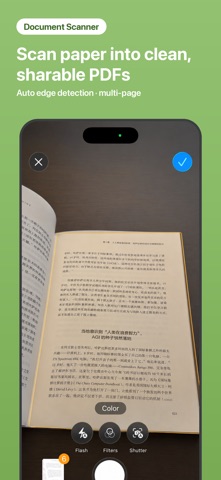
• Document Scanner
Scan paper documents into clean PDFs.
• Merge & Split PDF
Combine multiple PDFs and images into one — or extract, reorder, rotate and delete pages, and split a PDF into separate files.
• Compress PDF
Shrink oversized PDFs so they're easy to send and share.
• Protect PDF
Add a password to a PDF, or remove one you can unlock.
• Make ZIP
Compress files and folders into a ZIP archive, and unzip archives you receive.
• Clean Photo Metadata
Remove hidden GPS location, device model, and capture time from photos before you share them.
• Vault
Lock private files behind Face ID and hide them from your normal file list.
• Web Link to PDF
Save any web page as a PDF for offline reading.
• Mark Up Images
Draw and add simple notes to images.
• Privacy First
All your files stay on your device. Nothing is uploaded.
• Sign PDF — draw your signature once, save it for reuse, and place it right where it belongs.
iFiles has been on the App Store for years and is trusted by users worldwide for simple, reliable file management.
----------------------
iFiles Pro Subscription
iFiles is free to use. The following advanced features require an iFiles Pro subscription or a one-time lifetime purchase:
· Document Scanner (save) · Link to PDF (save) · Vault (add files)
· Image Metadata (EXIF/GPS) Cleaner (save) · PDF Merger (save) · Zip Maker (save)
Available plans (auto-renewing):
· Monthly: US$4.99 / month
· Yearly: US$19.99 / year (approx. US$1.67 / month)
· Lifetime (one-time purchase): US$49.99
Subscription terms:
· Payment will be charged to your Apple ID account at confirmation of purchase.
· Subscriptions automatically renew within 24 hours before the end of the current period at the same price, unless auto-renew is turned off at least 24 hours before the end of the current period.
· You can manage or cancel subscriptions in Settings > Apple ID > Subscriptions on your device. Cancellation takes effect at the end of the current billing period.
· No refund is provided for the unused portion of the current period.
Privacy Policy: https://ifiles.app/privacy/
Terms of Use (EULA): https://ifiles.app/terms/