GHOSTLINE WAS CREATED BY TATTOO ARTISTS, FOR TATTOO ARTISTS.
GHOSTLINE is a subscription based application for the tattoo industry. GHOSTLINE can quickly generate perfect, customizable stencils, upscale & sharpen your artwork, and provides the industry’s first print-scale technology so you can print your stencils at any size you need. GHOSTLINE was created to help you SAVE TIME. The AI-driven functionality of GHOSTLINE allows you to optimize your workflow and spend more time doing what you love most; making tattoos that you are proud of.
THE FUTURE OF TATTOOING IS HERE.
UPSCALE //
-ENHANCE YOUR ARTWORK & TURN YOUR PHOTOS IN TO PICTURE PERFECT REFERENCE
-USE HSV CONVERSION TO CREATE SMOOTH GRADIENTS FOR SHARP, RENDERED STENCILS
-TURN OLD, BLURRY PHOTOS IN TO PERFECT REFERENCE
SHARPEN //
-SHARPEN YOUR ARTWORK TO ACHIEVE BETTER QUALITY STENCILS
-SHARPEN YOUR REFERENCE SO YOU CAN CREATE BETTER TATTOOS
CLASSIC STENCIL //
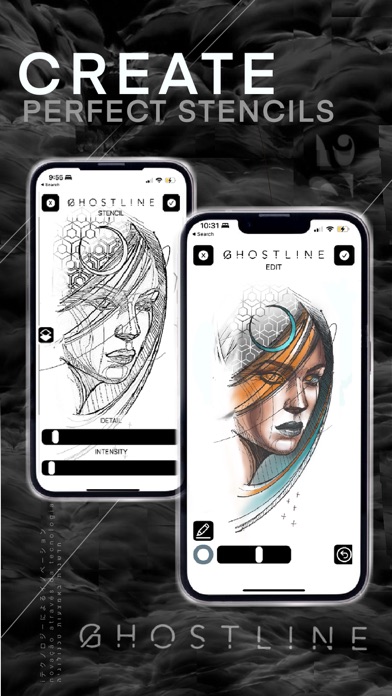
-GENERATE FULLY CUSTOMIZABLE STENCILS IN SECONDS
-ADJUST THE DETAIL AND INTENSITY TO YOUR LIKING
-CREATE LINE-BASED STENCILS, 3D VALUE-BASED STENCILS, AND EVERYWHERE IN BETWEEN
PRO STENCIL //
-CLEANEST POSSIBLE STENCILS USING BRAND NEW GHOSTLINE TECH
-ADJUST DETAIL LEVEL, CONTOURS, AND TAILOR OUTPUT FOR THERMOFAX OR INKJET
-NEVER HAND STENCIL AGAIN
EDIT //
-USE THE PEN TOOL TO DRAW EXTRA LINES OR MAKE AREAS MORE BOLD
-USE THE ERASER TOOL TO REMOVE ANY UNWANTED INFORMATION
-USE THE RULER TOOL TO DRAW PERFECTLY STRAIGHT LINES TO YOUR STENCIL
REFERENCE //
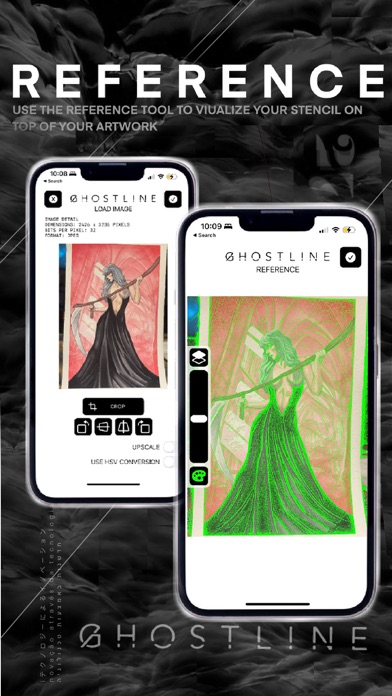
-USE THE REFERENCE TOOL TO VISUALIZE YOUR STENCIL, AS AN ADJUSTABLE LAYER, DURING THE TATTOO PROCESS
-ADJUST THE OPACITY OF THE STENCIL
-ADJUST THE TRANSPARENCY OF YOUR ARTWORK
-CHOOSE DIFFERENT COLORS A BETTER VISUAL GUIDE
PRINTING //
-USE THE INDUSTRY’S FIRST MULTI-PAGE LAYOUT PRINTING TECHNOLOGY TO PRINT AS LARGE AS YOU WANT, ONE ONE PIECE OF PAPER OR 16 PIECES
-PINCH/ZOOM TO SIZE YOUR STENCIL TO ANY SIZE ON THE PAPER, WHETHER YOU’RE WORKING ON A MICRO TATTOO OR A BACK PIECE
-ROTATE OR FLIP YOUR STENCIL TO FIT YOUR PRINTING NEEDS
-CHOOSE PAPER SIZE AND PAPER ORIENTATION
EXPORT //
-EXPORT/SAVE YOUR STENCIL, AT ANY STAGE, STRAIGHT TO YOUR PHOTO LIBRARY
-GENERATE AS MANY STENCILS AS YOU NEED
GHOSTLINE WILL SAVE YOU HOURS OF TRACING TIME, EVERY WEEK, SO YOU CAN FOCUS MORE ENERGY ON CREATING TATTOOS THAT WILL STAND THE TEST OF TIME.
Terms of Use -
https://www.ghostline.app/terms
Privacy Policy -
https://www.ghostline.app/privacy-policy