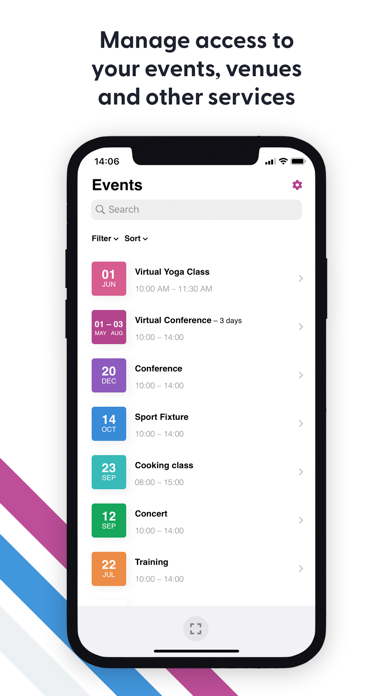
The FooEvents Check-ins app connects securely to any WordPress website that uses FooEvents, the #1 ticket plugin for WooCommerce. This app makes it easier than ever to manage access to your events, venues and other services like a pro!
Attendee Search
Easily find attendees that are registered for your event and view their information by searching for them by name or ticket ID.
Auto Check-ins
Speed up check-ins using the lightning fast auto check-ins option, which will automatically check-in an attendee and return to the scanning screen once their ticket has been successfully validated.
Barcode and QR Code Support
Scan the 1D barcode or QR code contained on the attendee's ticket directly from your device using the built-in camera or a handheld Bluetooth barcode scanner.
Bluetooth Scanner Integration
Scan tickets using your mobile device's built-in camera or pair your device to any handheld Bluetooth barcode scanner.
Bulk Status Updates
Quickly change the ticket status of multiple attendees by using the bulk update feature. Simply select the tickets and mark them as checked-in, checked-out or canceled.
Calendar and Image List Styles
Set the list style in the app to display events using their featured image or use the new date mode. The date mode will display a customizable color-coded date icon that will help make your events easy to spot even when you're in a rush.
Customizable Branding
Make the Check-ins apps your own by changing the logo and color scheme from the plugin settings to match your website.
Custom Terminology
Customize various terms used within the app including 'Events', 'Attendees' and 'Check-ins' to suit your business needs.
Dark Mode
The Check-ins app supports dark mode so you can save battery life and reduce eye strain and screen glare.
Filters and Sorting
New filter and sorting options are available for both events and attendees which helps to keep things organized and makes information easier to find, even for large events.
Flexible Event Scanning
Scan tickets for a specific event or use the global scan option to scan tickets from any screen.
Multi-language Support
Bonjour Hallo Hola Olá Hallå. Use the Check-ins app in your own language thanks to native support for 17 different languages. Change your language preferences at any time from your device settings.
Offline Mode
Don't stress if the power goes out or the internet connection drops as you can still do check-ins using the built-in offline mode until your connection is reestablished and the data automatically syncs.
Privacy Mode
Hide all personal information for attendees and/or ticket purchasers in the app. Only attendee names will be visible for check-in purposes.
Restricted Event Display
Manage which events are displayed in the app. By default, the Check-ins app displays all published events but you also have the option to display only the events that were created by the signed-in user or you can pre-select which events to display.
View Attendee Information
View information for attendees as well as any custom attendee fields that were captured when the ticket was purchased.