It’s your turn to go viral now! Filmora AI Video Editor (formerly FilmoraGo video editor) is an AI-based video editor & movie maker, featuring Image to Video, VideoGen, AI Auto Cut, AI Remover, Dynamic Captions, Text to Video, and powerful ai video effects! Let Filmora help you to become the next star on RedNote, lemon8, TikTok, Clapper and Flip!
[ AI Video Editor & AI Features ]
Image to Video
- Type in your creative ideas, then let AI magically bring life to your photos with advanced photo to video ai technology.
VideoGen
- This video-to-video feature lets you seamlessly swap or add elements to your videos.
AI Auto Cut
- Seamlessly stitching highlight moments into cinematic tales!
AI Remover
- Effortlessly erasing unwanted elements from videos.
Dynamic Captions
- Auto speech to text into dynamic word-by-word captions.
Text to Video
- Generate videos with AI copywriting and subtitles, while maintaining visual quality and adherence to your prompt.
Text to Speech
- Transform text into professional voiceovers for your videos.
AI Music & Sound Effects
- Generate professional music and soundscapes for your videos!
AI Smart Cutout
- Customized Cutout: Swipe your finger, then intelligently identify the target area and cut anything out as you want!
- Cutout Plus: You can set strokes, overlay effects, and replace backgrounds for your keyed objects.
[ User-friendly video editing for beginners ]
- Trim, split, duplicate, or merge video clips without losing quality.
- Add text, emoji, and exclusive stickers.
- Add music, sound effects & voice-overs.
- Extract music from the video and split audio to remove unwanted parts
- Rotate or crop: Adjust the orientation or size
- Adjust video ratios for Instagram/TikTok/Youtube posts.
- Adjust speed for fast or slow motion. Speed control with customizable & pre-set curves for various themes.
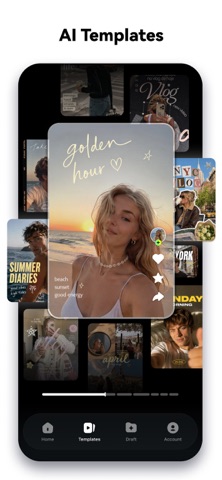
- Stunning templates help create videos in one click with built-in ai video effects.
[ Full-featured video editing for professionals ]
- All-in-one Keyframe: More adjustment items support keyframes, combined with color grading and special effects for videos, you can create more cool animations.
- Chromakey: Easily edit green screen video.
- PIP (Picture in Picture): add multiple layers of video, images, stickers, special effects, text, etc.
- Masking: Cover and mix video clips, get different video effects.
- Smart tracking: Support stickers, text, and picture-in-picture intelligent tracking targets, whether you need to track faces, objects, or anything else.
[ FILMORA PRO SUBSCRIPTION ]
- With Filmora Pro video editor unlimited subscription, you can access all features and paid editing materials including stickers, filter packages, etc. Watermark and Logo Roll will be removed automatically.
- With “iOS Pro”, you can access all Pro features and paid editing materials on iOS.
- Subscription: Monthly, Annual or Perpetual billing.
- Payments will be charged to your iTunes account.
- Subscriptions will automatically be renewed unless auto-renew is turned off at least 24 hours before the time of renewal.
- Your account will be charged for the subscription renewal up to 24 hours prior to the end of your current subscription period in order to avoid service gaps.
- You can turn off auto-renewal at any time through your Account Settings.
- Any unused portion of a free trial period, if offered, will be forfeited when the user purchases a subscription.
[ PRIVACY & TERMS ]
Terms of Use
https://www.wondershare.com/company/terms_conditions.html
Privacy Policy
https://www.wondershare.com/privacy.html
[ CONTACT US ]
We value your feedback and here’s how you can contact us:
mailer@service.wondershare.com
http://support.wondershare.com
https://www.facebook.com/filmoravideoeditor
https://www.instagram.com/filmora_editor/
https://www.youtube.com/c/FilmoraWondershare