A doctor's office, an insurance company, or a government office asked you to fax something — and you don't have a fax machine. Faxeau sends it from your iPhone or iPad. Scan it, sign it, send it, and see when it arrives.
No subscription. No monthly fee. Buy fax pages only when you need them. They never expire.
Faxeau sends faxes. It can't receive them.
"I'VE NEVER SENT A FAX"
1. Add your pages: scan paper, or pick a PDF, Word file, or photo.
2. Type the fax number.
3. Check your fax, then tap Send Fax.
The app guides you through each step. No fax experience needed.
"I NEED TO FAX THIS TODAY"
• Scan paper with your camera. Pages are straightened and cleaned up for faxing.
• Send PDFs, Word files (.docx and .doc), and photos from Photos or the Files app, including iCloud Drive.
• Put scans, photos, and files together in one fax, in any order.
• On iPad, drag a file onto the Send screen to start a fax.
"THE OFFICE HAS TO ACCEPT IT"
• Tap to fill in PDF forms that have fields — no need to print them.
• Write, type, or add the date anywhere on a page.
• Sign with your finger and save your signature for next time.
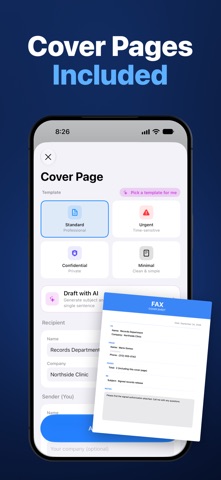
• Add a cover page: Standard, Urgent, Confidential, or Minimal. On devices with Apple Intelligence (iOS 26 or later), it can write the subject and notes from one sentence you type.
• Start from a ready-made records request, authorization form, or letter.
"IT HAS TO GO TO THE RIGHT NUMBER"
• We show the number back in big, clear digits, and tell you if digits or the area code are missing.
• You see the exact pages being sent, right under the number.
• Pick a number from Contacts, choose which one is the fax line, and get a warning if your contacts list it as a mobile.
"DID IT ARRIVE? DO I NEED TO CALL THEM?"
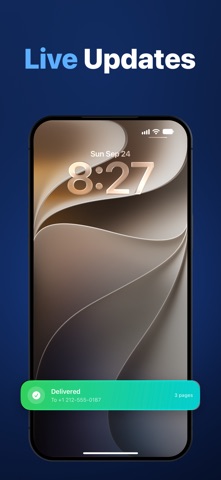
• Watch it go from Sending to Delivered. It updates by itself.
• Get a notification when it's delivered. On iPhone, you can also follow it live on your Lock Screen.
• Still sending after 20 minutes? We tell you to call the office's regular number before you send it again.
• If it fails, we tell you why when we can, like a busy line or a wrong number, and whether sending again will help.
• Only some pages arrived? We tell you that too.
• If we can't confirm a fax, we tell you so instead of guessing.
• Sending to several offices? You get an answer for each one.
"HOW MANY PAGES WILL THIS USE?"
• Before you send, you see how many pages the fax will use and, once you're signed in, how many you'll have left.
• Once you're signed in, your page balance is at the top of the Send screen.
• If a fax fails, we tell you whether your pages came back.
• Tapped Send twice by mistake? The fax is only sent, and charged, once.
"THEY SAY THEY NEVER GOT IT"
• Save a PDF receipt for any fax: where it went, when, and what happened. For delivered faxes, it can also show the pages received and how long the call took.
• Your sent faxes stay in your account. Search by name, number, date, or status.
• Resend in a few taps. Your pages and number are already filled in.
"I WANT IT EASY AND PRIVATE"
• Works with large text and VoiceOver.
• Your saved numbers, signatures, and sender name sync across your devices with iCloud.
• Look around first. Sign in only when you buy pages or send, with Sign in with Apple. No passwords.
• Delete your account and its data from inside the app, anytime.
Privacy Policy: https://fierce-inlet-63133.herokuapp.com/fax-privacy-and-term
Terms of Use: https://www.apple.com/legal/internet-services/itunes/dev/stdeula/