Scan, OCR, Edit, and Share Documents Instantly
Turn your iPhone into a powerful, high-speed scanner. FasterScan lets you scan multi-page documents on the go—no bulky scanner needed. From receipts and business cards to books and posters, capture anything with precision, even if the document is curled.
Crystal-Clear Scans, Every Time
• Smart Edge Detection – Automatically detects document edges and corrects perspective.
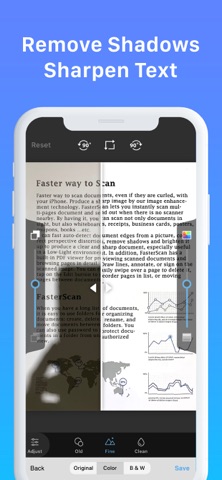
• Advanced Image Enhancement – Removes shadows, sharpens text, and brightens scans, even in low-light conditions.
• Multi-Lens Camera Optimization – Captures details at different focal lengths for the best results.
OCR & Document Editing
• Extract text from scanned images with OCR, and export as TXT or DOCX files.
• Smart Formatting – The OCR function detects and restores font styles and colors on a line-by-line basis.
• Business Card Scanner – Instantly digitize business cards, extract contact details using OCR, and save them directly to your phone's address book.
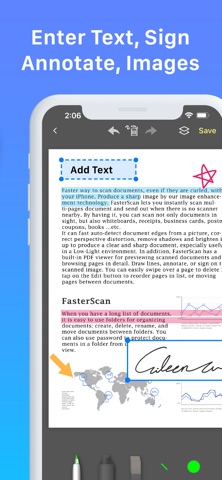
• Edit, annotate, draw, or sign directly on scanned pages.
• Organize pages easily—reorder, delete, or move between documents.
Seamless Document Management
• Create folders, rename files, and protect sensitive documents with passwords.
• Search by name or perform a full-text search within OCR-processed documents.
Export & Share with Ease
• Support exporting searchable PDFs.
• Fax Worldwide – Send faxes to over 100 countries, even without a fax machine.
• Wi-Fi & iTunes File Sharing – Access PDFs instantly from your computer.
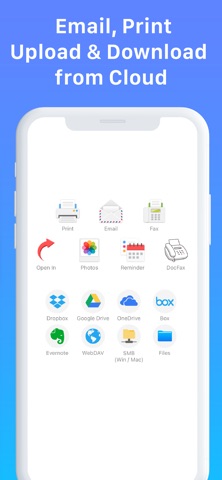
• Multiple Export Options – Save as PDF/JPEG, print via AirPrint, or open in other apps like iBooks and Kindle.
Cloud Integration & Advanced Import/Export (Bronze/Silver/Gold Plans)
• Upload/download from Google Drive, Dropbox, One Drive, iCloud Drive, SMB (Windows/Mac/NAS), and WebDAV.
• Import JPEGs and PDFs from other apps or cloud storage.
Extra Features
• Receive Faxes – Purchase a number to receive faxes or block unwanted ones.
• Photo Collage – Merge multiple scans into a single sheet, perfect for ID cards.
Effortlessly scan, store, and share documents—wherever you are. Try FasterScan today!
Subscription Plans
Unlock premium features with Bronze, Silver, or Gold plans, including:
• Cloud Backup & Restore: Access previous versions of your documents anytime
• Flexible subscription options: Monthly or annual plans available
• Subscription renews automatically unless auto-renew is turned off at least 24 hours before the end of the current period
• Account will be charged for renewal within 24 hours before the end of the current period. The cost depends on the selected plan
• Subscriptions may be managed by the user, and auto-renewal may be turned off by going to the user's Account Settings after purchase
• Any unused portion of the free trial will be forfeited when the user purchases a subscription or cancels it
Terms of Service: https://ifunplay.com/legal.html