Snap the receipt. That's the whole data entry.
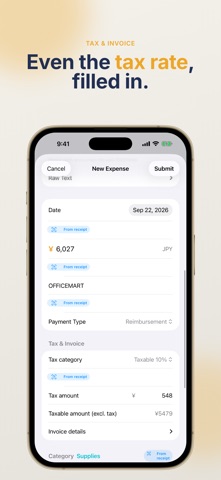
Expenses99 turns a photo of a receipt into a complete expense record: date, amount, merchant, category and tax rate, filled in for you. Use it alone as a freelancer or sole proprietor, or with a small team that needs approvals and reimbursement. It's the same app either way.
WHO IT'S FOR
- You face a pile of receipts at the end of every month
- Receipts that mix 8% and 10% tax rates slow you down
- You type invoice registration numbers by hand
- Your team's out-of-pocket expenses need approval and settlement in one place
- You want expenses in a format your accounting software can import
SNAP IT ONCE, EVERYTHING FILLS IN
- Date, amount, merchant, category, tax category and tax amount are read from the receipt
- Japan's qualified invoice registration number (T + 13 digits) is captured too
- Receipts that mix 8% and 10% rates get a per-rate breakdown automatically
- Fields the scanner isn't sure about are flagged "Needs review", so you only double-check what matters
- Merchants you've entered before remember their category
- Batch entry: scan a stack of receipts in a row and submit them together
- Recurring expenses: expenses you log every month are detected and offered with one tap
BUILT FOR JAPAN'S INVOICE SYSTEM AND E-BOOKKEEPING RULES
- Records the tax category (10%, reduced 8%, tax-exempt, out of scope) and per-rate breakdowns
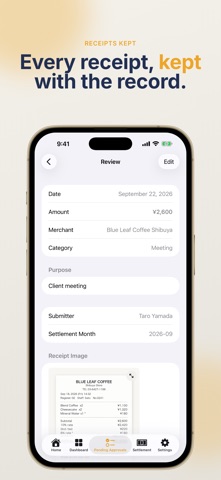
- Keeps the receipt image with the record, searchable by date, amount and merchant
- Stores a SHA-256 hash of each image as evidence the record is unaltered
TEAM APPROVALS AND SETTLEMENT
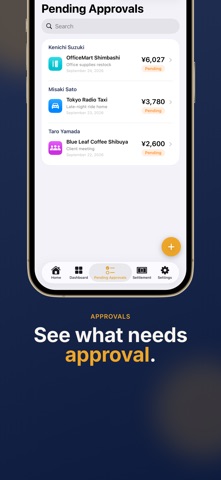
- See everything waiting for approval and approve in bulk
- Track approved and paid status, and settle from one screen
- Admins can file expenses on behalf of members
- Add members with an invite code. The approval flow appears when you need it
STRAIGHT INTO YOUR ACCOUNTING SOFTWARE
- CSV export in freee, Yayoi and Money Forward journal formats
- Map app categories to your chart of accounts
- Email a standard expense list CSV in one tap
GOOGLE INTEGRATION
- Approved expenses are appended to a Google Sheet automatically
- Receipt images are saved to a Google Drive folder
- Choose or customize the sheet columns, including an accounting preset
DASHBOARD
- Pending, approved and paid totals for the month on one screen
- Filter the expense list by period and amount, and search by merchant, purpose or submitter
JAPANESE AND ENGLISH
PRICING
Expenses99 requires a subscription (auto-renewable). It includes everything:
- Receipt scanning and unlimited expenses
- CSV export in freee, Yayoi and Money Forward formats
- Team features (member invites and approval flow)
Monthly: $2.99 / month
Yearly: $29.99 / year
Try the yearly plan free for 1 month. Cancel during the free period and you won't be charged.
Prices are shown in your local currency in the App Store.
Payment is charged to your Apple ID account. Subscriptions renew automatically unless cancelled at least 24 hours before the end of the current period, and your account is charged for renewal within 24 hours before the period ends. You can manage or cancel your subscription in your App Store account settings after purchase.
Terms of Use: https://www.apple.com/legal/internet-services/itunes/dev/stdeula/
Privacy Policy: https://takayukimeilyn.github.io/menuplanner/privacy-policy.html
Expenses, finished at the moment you snap them.