Record once. Get two videos. Ready for every platform.
DualCam captures video and instantly produces two perfectly cropped files -- a vertical 9:16 for social media and short-form video, plus a horizontal 16:9 for widescreen viewing, presentations, and TV. One tap. Two files. Zero editing.
DUAL LENS CAPTURE
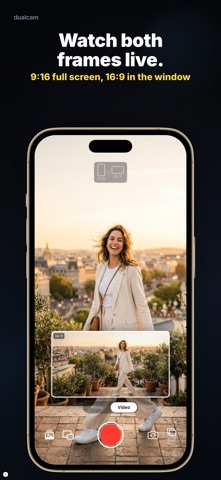
On supported iPhones, DualCam activates two rear cameras simultaneously -- wide-angle and ultra-wide (or telephoto) -- giving you two live perspectives at once. A draggable Picture-in-Picture preview lets you monitor both feeds in real time.
SMART DUAL OUTPUT
Every recording saves two perfectly synchronized video files directly to your Photos library:
- Portrait (9:16) -- optimized for vertical platforms
- Landscape (16:9) -- optimized for widescreen viewing
Both files share identical timestamps, frame for frame.
PROFESSIONAL 4K QUALITY
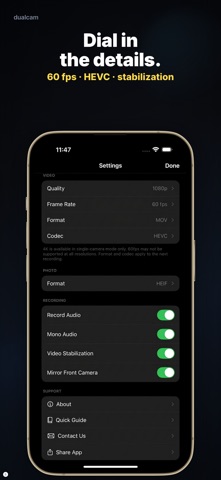
- Up to 4K resolution at 24, 30, or 60 fps
- HEVC (H.265) encoding with bitrates matching the native iPhone Camera app
- MOV format for professional editing in Final Cut Pro, DaVinci Resolve, or Premiere Pro
- MP4 format for quick, direct sharing to any platform
- ProRes codec support for maximum quality
INTUITIVE CAMERA CONTROLS
- One-tap recording with a clean, full-screen camera interface
- Dual Lens / Single Lens toggle for flexible shooting
- Front camera support for selfie recording and vlogging
- Flash control (Auto / On / Off)
- Live recording timer
- Crop guide overlay shows exactly what each output will look like
UPLOAD DIRECTLY FROM THE APP
Sign in to your account, set your privacy preference, and upload your horizontal or vertical video straight from the app -- no export, no file transfer, no hassle.
SMART & STORAGE-AWARE
- Automatically detects your device's multi-cam capabilities
- Shows estimated file size per minute and remaining recording time
- Displays effective frame rate -- no hidden quality downgrades
- All settings persist across sessions
BUILT FOR CONTENT CREATORS
Whether you create vertical clips, short-form video, or widescreen content -- DualCam eliminates the need to record twice or crop in post. Film once, get both formats, and publish everywhere.
Perfect for content creators, vloggers, social media managers, videographers, event professionals, and anyone who publishes to multiple platforms.
SYSTEM REQUIREMENTS
Requires iPhone XS or later. Dual Lens mode requires a device with multiple rear cameras.
Subscription plans
DualCam offers limfetime, annual and weekly subscription plans.
Subscription Details
-Membership periods are 1 week, and 1 year.
-Membership renewals are made on a weekly and annual basis.
-Payment will be credited to your iTunes account once you confirm the subscription purchase.
-Your subscription will automatically renew unless auto-renew is turned off 24 hours before renewal.
-Renewal will be credited to your account 24 hours before the end of the subscription period.
-Remaining parts of the trial membership with the beginning of the membership cannot be requested.
Privacy Policy
https://dualcam.app/privacy-policy.html
Terms of service
https://dualcam.app/terms-of-service.html