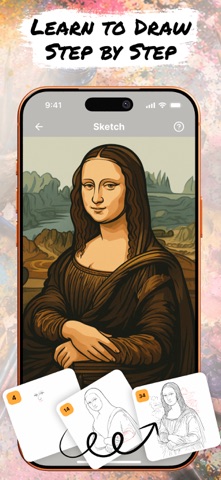
Bring Your Imagination to Life with Drawsy: AR Draw for Sketching!
Our art AR Drawing app turns your iPhone into a virtual projector that helps you simply draw with precision. Here’s exactly how the process works:
1. Select an Image
Start by choosing an sketch from the app’s built-in gallery — like a cartoon character, animal, flower.
2. Position Your Paper
Place a blank sheet of paper on a flat surface (like a desk or table) in a well-lit environment. Make sure your phone can see the entire sheet.
3. Activate AR Mode
Open the image in AR mode. Your phone will use its camera to detect the paper and overlay the image directly on top of it through the screen.
4. Adjust the View
Move your phone until the image is perfectly aligned with the paper. You can resize or rotate the image using your fingers to make sure it fits exactly the way you want.
5. Start Tracing the sketch
Now, simply look at your phone screen while keeping your pencil on the paper. The image appears “on the paper” in your screen view, allowing you to trace the lines precisely. It feels like you’re copying a transparent image that’s floating above your paper — but with total control!
6. Finish & Save
Once your outline is done, you can finish the drawing with your own style — add colors, shading, or extra details. If you want, you can record a video of your drawing process, as well as take a photo of your finished work and save or share it directly from the app.
Why It’s So Effective
Traditional tracing requires light tables or printed guides. With AR Drawing, you trace using your eyes and hands guided by real-time AR projection — no special tools, no printing, no setup. Just your iphone, a pencil, and paper.
Discover a fun new way to sketch and paint using Augmented Reality. Whether you’re a beginner or a pro, simply AR Draw App helps you trace anything with precision and ease.
Our app also lets you record your drawing process. Share the video with friends and show off your skills!
Subscription Information:
Unlock the full experience of Drawsy with a subscription.
- Payment will be charged to your iTunes account at confirmation of purchase.
- Subscriptions automatically renew unless canceled at least 24 hours before the end of the current period.
- Renewal charges will apply within 24 hours prior to the end of the current period, indicating the cost of the renewal.
- Manage or cancel subscriptions in your account settings after purchase.
- Free trial periods will be canceled when your subscription is activated.
- If your subscription is not canceled before the end of the free trial period, your subscription will be activated for the selected period and your account will be charged automatically.
Terms and Conditions: https://telegra.ph/Terms-Of-Use-12-30-4
Privacy Policy: https://telegra.ph/Privacy-Policy-12-30-117