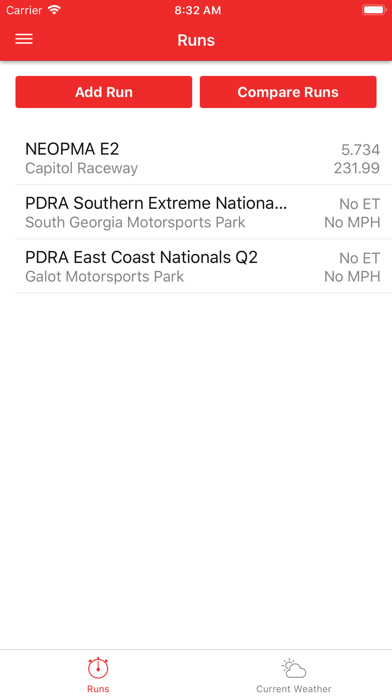
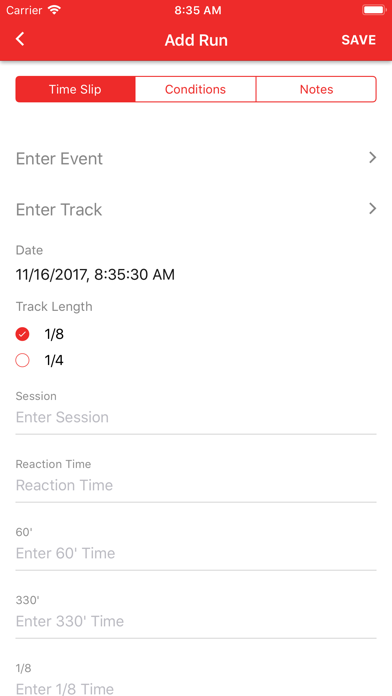
The DragTuner run logger is the core of the mobile app. It allows users to log their timeslip, conditions, and other various information. Choose a track from one of the many pre-loaded tracks in the United States or add your own. DragTuner allows you to add the event as well which will be saved for later runs. Choose between ¼ mile and ⅛ mile and enter your timeslip.
Version 2.0.0 introduces some features such as ET Prediction and car configurations. ET Prediction allows a user to predict their ET based on three previous runs and the current weather. Car configurations allow the user to separate their logged runs by vehicle as well as add custom fields for each vehicle.
Track and weather conditions are key to your race car’s performance. When adding a run, under the conditions tab, click Get Weather to get the latest weather based on your location. DragTuner uses location services in your device to get your location and query the closest weather station in your area. We return the following fields: temperature, density altitude, humidity, barometer, dew point, wind speed & direction, and water grains. On this same screen, there are also fields for track temperature and notes.
The notes screen, which can be found under the “Notes” tab on the “Add Run” screen, is used for storing car setup notes. Currently we support the following fields: estimated ET, dial in, delay, tire pressure, and notes.
All of the fields described above can be filtered and sorted upon by using the Filter Run feature by pressing the filter icon on the home screen in the top righthand corner.
DragTuner requires a subscription to use the application. DragTuner subscriptions give the user full access to the app and they are auto-renewing. Payment will be charged to your iTunes account at confirmation of purchase. The subscription automatically renews unless auto-renew is turned off at least 24 hours before the end of the current period. Your account will be charged for renewal within 24 hours of the end of the current period at a price of either monthly or yearly price depending on your subscription. Subscriptions may be managed by the user and auto-renewal may be turned off by going to Account Settings on the device after purchase. A free trial period of 7 days is included with the subscription. After the trial period expires, you will be charged at the monthly or yearly price depending on your choice when you sign up.
Terms of use: https://dragtuner.com/terms-conditions
Privacy Policy: https://dragtuner.com/privacy-policy