Scan, OCR, Edit & Share PDF Documents with Ease
Transform your iPhone or iPad into a powerful pocket scanner, PDF editor, and business card scanner. Quickly scan multi-page documents, recognize text, edit PDFs, fill forms, sign documents, scan business cards, and share files anytime, anywhere.
Key Features
● High-Quality Scanning & OCR
• Auto-detect document borders and correct perspective distortion
• Enhance images by removing shadows and sharpening text
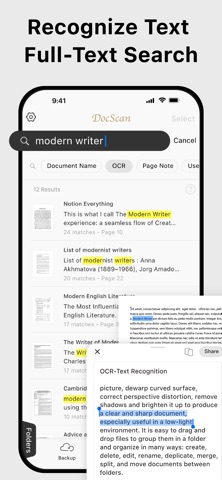
• Extract text from scanned images with OCR and export as TXT or DOCX
• Smart Formatting: The OCR function detects and restores font styles and colors on a line-by-line basis.
● Business Card Scanner
• Scan business cards and automatically extract contact information with OCR
• Save scanned business cards as searchable digital contacts within the app
• Export contacts directly to the iOS Contacts app with a single tap
● Edit & Annotate
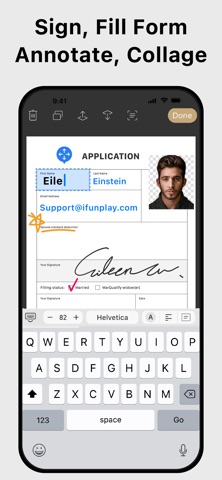
• Fill out forms, highlight important details, or sign documents
• Add text, lines, and images to scanned documents
• Merge multiple scans into a single PDF
● Organize & Secure Your Documents
• Easily search and manage files with folders and custom naming rules
• Protect sensitive documents with password encryption
● Seamless Sharing & Cloud Integration
• Share scans as PDF, JPEG, TXT, or DOCX via email, fax, SMB, WebDAV, and cloud storage (iCloud Drive, Dropbox, Google Drive, OneDrive, Box, Evernote, and more)
• Print with AirPrint or save directly to Photos
● Advanced Features
• Photo Collage: Combine multiple pages into a single sheet (for example, both sides of an ID card on one A4 page)
• QR Code Scanner: Scan from the camera or photo library to open URLs, call phone numbers, send emails, or add contacts
• Fax Anywhere: Send and receive faxes worldwide with real-time delivery status notifications
● Import & Export
• Import PDFs and JPEGs from other apps or cloud storage
• Export searchable PDFs
• Export documents to iTunes, Reminders, and Apple, Google, or Outlook Calendars
● Receive Faxes (Non-Renewing Subscription)
• Purchase a dedicated fax number to receive faxes
• Disable fax reception whenever you no longer need to receive faxes
Subscription Plans
Unlock premium features with Bronze, Silver, or Gold plans, including:
• Cloud Backup & Restore: Access previous versions of your documents anytime
• Flexible monthly and annual subscription options
• Subscription renews automatically unless auto-renew is turned off at least 24 hours before the end of the current billing period
• Your account will be charged for renewal within 24 hours before the end of the current period. The renewal price depends on the selected plan
• You can manage your subscription and turn off auto-renewal in your Account Settings after purchase
• Any unused portion of a free trial will be forfeited when you purchase a subscription before the trial ends
Terms of Service: https://ifunplay.com/legal.html