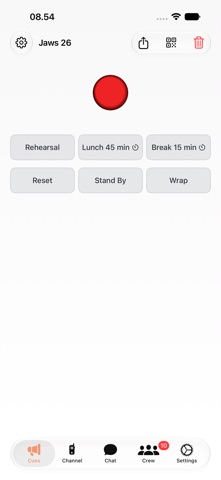
CrewCast keeps your whole crew in sync. Designed specifically for film productions — from major studio sets to small indie shoots — it puts everyone on the same beat: "Quiet on Set!", "Action!", "Cut!" reach every crew member instantly, with silent CUE signals during takes and live production status on the phones they already carry. Push-to-talk voice channels and group chats are built in — and it all works alongside your existing gear, so keep your radios for what they do best.
ACTION COORDINATION
- Instant production-wide alerts: "Quiet on Set!", "Action!", "Cut!"
- Non-blocking action banners — crew keeps working while staying informed
- Adjustable countdown timers for timed actions (Lunch, Break)
- CUE signals to actors and crew during takes
- Visual countdown timers and BPM pulses
- Lock screen notifications via Live Activities
VOICE CHANNELS
- Walkie-talkie style push-to-talk communication
- Open mic mode for continuous transmission
- Main channel for production-wide announcements
- Team channels for department-specific coordination
- Private group channels for quick collaborations
- Auto-reconnect keeps you connected on spotty set WiFi
- Toggle mic with AirPods or any Bluetooth headset
- Audio continues on lock screen via CallKit
GROUP CHATS
- Create group conversations with anyone on the production
- AI-generated chat names for quick identification
- Any group member can invite others
- Unread message badges so you never miss a message
- Team chat and production-wide chat built in
CREW & AD MANAGEMENT
- Promote or demote crew members to AD with a swipe
- Organize crew into teams (Camera, Sound, Lighting, etc.)
- QR code crew onboarding — scan to join
- AD invite QR codes for quick onboarding of assistant directors
HARDWARE INTEGRATION
- CrewCast Button for hands-free control
- Pair physical buttons via Bluetooth
- Trigger actions and CUEs from anywhere on set
BUILT FOR PRODUCTION
- Works reliably on set with poor connectivity
- Battery-efficient design for all-day shoots
- Dark mode optimized for low-light sets
- Also available on Mac for video village
- Designed with input from professional film crews
FLEXIBLE PRICING
- Subscribe monthly for ongoing productions
- Or buy a Day Pass (2/3/5/7 days) for a one-off shoot — no subscription needed
- Day passes stack and are only used on the days you actually run a production
Your AD triggers "Quiet on Set" and every crew member sees it instantly — no more missed calls.
Perfect for:
- Feature films and TV productions
- Documentary crews
- Commercial shoots
- Music video productions
- Live events and broadcasts
Free to try. Go Pro with a subscription — or grab a Day Pass (2/3/5/7 days) for one-off productions, no subscription required.
Terms of Use (EULA): https://crewcast.online/terms
Privacy Policy: https://crewcast.online/privacy