You need 200g of sugar but you don’t have a scale—just a measuring cup?
You need 1.5 tbsp of baking powder, but you only have a scale?
You need to know how many strawberries you can expect in a 250g container?
You need to cook for 7 people, but your recipe is for 2 servings?
You need to mark your recipe ingredients as you’re cooking?
You need to share your favorite recipes with friends?
We got you covered!
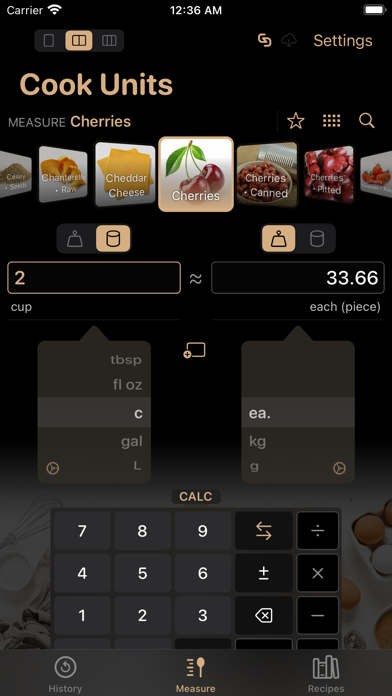
Cook Units is a measure converter for cooking ingredients designed with usability in a kitchen context. It features a growing set of 1,220+ ingredients with images, and a recipe manager. It works great in light or dark mode, portrait/landscape mode, and in iPad’s Split View/Slide Over layouts. The app can switch between 5 languages (English, French, Japanese, Italian, and Spanish) without changing the language of the device.
CONVERT QUANTITIES
Conversions of measures can be carried out between weight and volume (e.g. grams to/from cups) and displayed with fractions. Units of measurement automatically adjust to the order of magnitude of the quantities being measured. For example: 8 tbsp (tablespoons) will also show as ½ c (cup,) and 1,000 g (grams) will be displayed as 1 kg (kilogram.)
While calculations are exact between weight units or volume units and displayed with up to 2 decimals, they are approximated across weight/volume—depending on an average volumetric mass for the measured ingredient. Conversions also make reasonable approximations in order to display closest fractions, when applicable.
CREATE / SHARE / RECEIVE RECIPES
Ingredients are browsable as a cover flow, grid, or searchable tagged list.
Measured ingredients can be assembled into a recipe with an associated number of servings. Recipes live in iCloud when your account is connected, and so they will appear on any device connected to the same account.
Recipes can be associated with notes, locked to avoid mishaps, and shared via Messages, email, AirDrop, etc. in (filtered) bulk or individually. You can also send them to yourself to create backups.
ENJOY COOKING!
Adjust the number of servings for your recipe and the quantities will automatically resize accordingly with appropriate measuring units.
Mark the ingredients in your recipes as you are cooking or shopping for groceries.
Just tap a recipe ingredient to see its equivalent measures in weight and volume on the fly.
Happy Cooking!