■ Notifications get missed. Alarms don't.
Ever missed a meeting because the calendar banner vanished in a second —
or never made a sound in Silent or Focus mode?
CalAlarm turns just the events you can't afford to miss
into full-strength alarms, powered by the same mechanism as the Clock app.
■ One switch. That's the whole workflow.
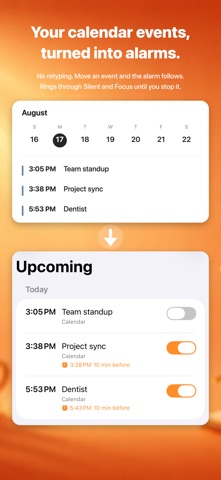
- Your next 7 days of calendar events, listed automatically
- Flip the switch on the important ones — they become alarms
- No more copying times into the Clock app by hand
■ Rings through Silent and Focus
Built on iOS's alarm engine — the same one the Clock app uses.
Silent switch on? Do Not Disturb? It rings until you stop it.
■ When your calendar moves, alarms move too
- Meeting moved from 10 to 11? The alarm follows automatically
- Event deleted? The alarm is removed
- Your calendar is the source of truth — always in sync
■ Flexible lead times
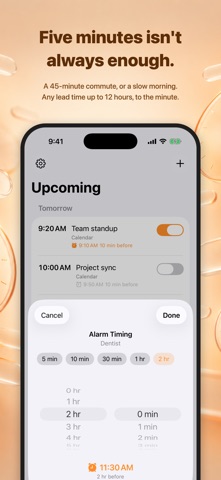
- Set a global default, anywhere from on time to 12 hours before
- Override per event: dentist 30 min early, a commute morning 2 hours
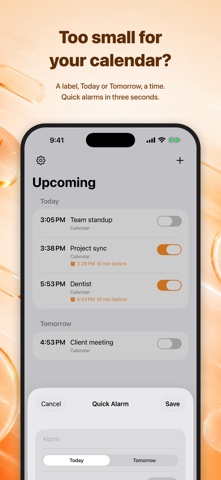
■ Quick Alarms
For errands too small for the calendar:
a label, Today/Tomorrow, a time. Three seconds.
■ Home Screen widget
See upcoming events and alarm states at a glance,
and toggle alarms with a tap — without opening the app.
■ Privacy first
- No account. No server.
- Your calendar content never leaves your device
- No tracking. No ads.
■ Made for you if…
- You've been late because you missed a calendar notification
- You keep re-checking the clock before important events
- You manually re-type event times into the Clock app
- Working from home, you fear joining meetings late
- You prefer simple, pay-once tools
■ Requirements
Requires an iPhone running iOS 26 or later
(uses the system's Clock-grade alarm engine).