Blark is an Apple featured, beautifully designed, easy-to-use, black & white/monochrome camera app for iPhone. It’s the best and most pro way to take black and white pictures & videos on the iPhone for everyone. Blark elevates your black and white photography and videography.
Whether you are a casual or pro photographer, Blark packs full of features to help you take incredible black & white photos as well as videos.
The Right Tools
All you need to take the best black & white pictures and video on the iPhone. Adjust your CONTRAST, BRIGHTNESS, HIGHLIGHTS, SHADOW & SATURATION in real time, right before you take your shot.
Manual focus lets you set your focus just where you want it. Use the grid overlay and spirit level to compose your shots precisely.
_
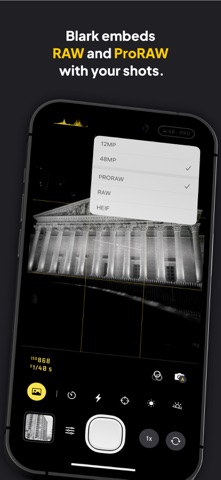
RAW & ProRAW Capture
Blark lets you shot in RAW or ProRAW and embeds the raw data in the capture. Giving you the ability to access the raw data later if you want to. You can also shoot straight to JPEG (HEIF)
_
Manual Or Auto Exposure
Gain complete control over exposure, whether you want to use auto exposure or manual exposure controls including shutter speed and ISO.
_
Color Tint
Add subtle tints to your images. Choose a tint using the tint slider, use with any of the Blark presets.
_
MonoChrome Magazine
Enjoy Monochrome, a Blark magazine featuring standout black and white photography from creators around the world along with thoughtful tips, guides, and perspectives to inspire, refocus, help you move through creative blocks, and shoot stronger black and white images.
_
Histogram
Never underexpose or overexpose your captures again. Use the histogram to get your exposures just right to avoid shadow or highlight clipping
_
Apple Watch Remote
Use the companion Apple Watch app as a remote, giving you quick access to snapping photos and recording videos from your wrist.
_
Camera Control & Lock Screen Capture
Launch Blark from your lock screen or with the camera control button, making sure you never miss that next shot
_
Presets
Use any of Blark’s gorgeous presets or create, save and reuse your own. Save CONTRAST, BRIGHTNESS, HIGHLIGHTS, SHADOW & SATURATION as presets, and reuse them in any of your captures. Presets sync across iCloud, so you never lose them unless deleted.
_
Beautifully Designed & Private
Blark doesn’t track you in any way or transits any of your information. Location data requested is solely used for tagging in your photos and never stored or shared. Neither is data also collected on any of your photos. Blark is beautifully designed to give you the best tools to create great black & white captures while also protecting your privacy
* Blark is not free. A 7-day free trial is available for all subscription plans. If you don’t like subscriptions, you can also buy a lifetime purchase with a single in-app purchase
* ProRAW requires iPhone 12 Pro/Pro Max or newer
Privacy Policy: https://blark.app/privacy
Terms Of Use: https://blark.app/terms